

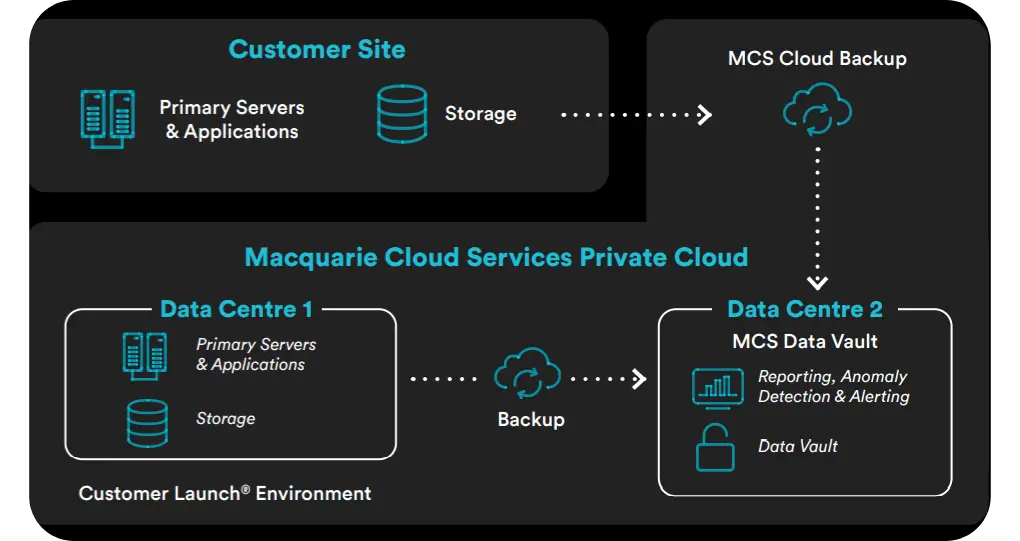
The moment your screen goes dark—whether it’s from a nasty sidewalk drop or a random internal glitch—is usually met with a heavy dose of panic. To get your digital life back when your screen goes completely black, you need to lean on a solid setup for cloud backup and recovery that keeps your data on remote servers instead of just inside that broken piece of hardware. This ensures that even if the phone itself is toast, your photos, contacts, and settings are still sitting safely behind your account login, ready to be pulled down onto any working screen.
The Moment the Hardware Fails
That “bricked” feeling is less about the expensive glass and more about the data trapped behind it. We carry our whole lives on these devices, from two-factor codes to years of family videos. When the display dies, the hardware stops being a tool and becomes a paperweight. At that point, your focus has to shift entirely towards data continuity.
If you’ve been using a platform-level service, your info is essentially sitting in a digital vault. Getting back to normal isn’t about repairing the dead phone; it’s about “summoning” your digital identity onto a fresh device.
How the Restoration Process Works
When you accept that the screen isn’t coming back, the recovery path is actually pretty straightforward. It usually happens in three main steps:
Keeping Your Memories from Vanishing
The hardest part of a hardware failure is the fear of losing photos. You can always re-download an app, but you can’t recreate a graduation photo. Modern systems handle this by constantly mirroring your gallery to a secure environment so nothing is truly “local” anymore.
Securing Your Digital Legacy
It’s not just about the sentimental stuff. Think about the massive headache of losing your entire contact list or your work calendar. Most of us can’t afford a day of “digital blindness” in a professional setting. By moving away from saving things only on your phone, you create a fail-safe that turns a total hardware disaster into a 20-minute annoyance.
Take a second to check your “last saved” date. If your device hasn’t checked in with the server in three months, a black screen today means you’ve effectively lost three months of your life.
Take Action Before the Dark Screen
Don’t wait for a hardware catastrophe to find out if your stuff is safe. Spend five minutes today poking around your settings to make sure your automated saving features are actually turned on. It’s the kind of maintenance you’ll be incredibly grateful for when the inevitable happens.

© 2025 Crivva - Hosted by Airy Hosting Managed Website Hosting.