

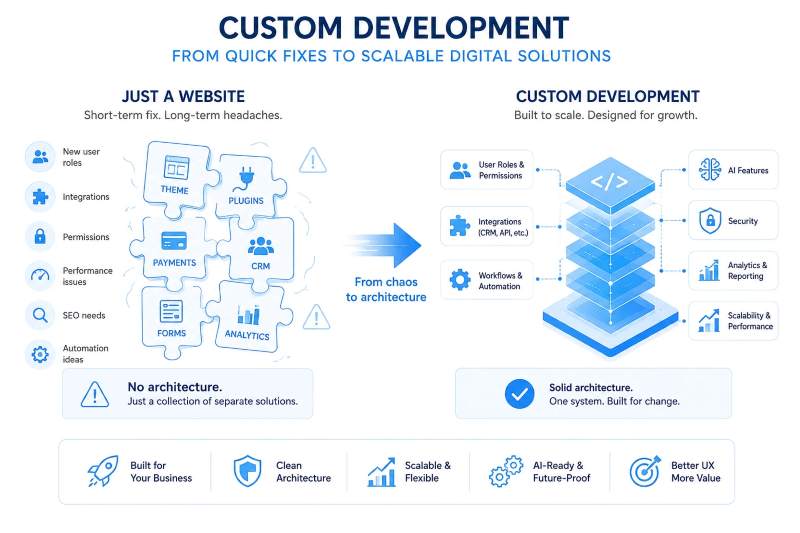
Custom development is no longer just about “building a website” or “creating an app.” It is about building a digital system that can support business logic, user roles, integrations, automation, AI features, security, analytics, maintenance, and future growth.
This is where many businesses make their first major mistake. They ask, “How much does it cost to build a platform?” But a better question is: “What kind of system are we building, and how should it work one, two, or five years from now?”
Custom development is not always the cheapest option at the beginning. But it is often the right path when a business has a unique model, complex workflows, custom logic, multiple user roles, integrations, or plans to build a product as a long-term asset instead of a one-time website.
More about custom web development services: https://kavitasystems.com/our-services/custom-web-development-services
A simple website may be enough for a small local business: a homepage, several service pages, a contact form, a blog, and a basic admin panel.
But for SaaS products, B2B platforms, marketplaces, client portals, internal CRMs, booking systems, AI assistants, or eCommerce products with custom logic, “just a website” quickly turns into technical debt.
At first, it seems cheaper to use a ready-made theme, add plugins, launch a quick MVP, connect payments, CRM, forms, and analytics. But after a few months, the business starts growing. New user roles appear. New scenarios, permissions, integrations, SEO needs, performance requirements, and automation ideas show up.
Then it becomes clear that the product does not really have an architecture. It has a collection of separate solutions that were never designed as one system.
Custom development is needed when a business cannot fully fit into a template. If you have custom booking logic, complex accounts, workflows, CRM integrations, payment systems, AI modules, document flows, search, or analytics, you need more than coding. You need architectural thinking. More about this approach: https://kavitasystems.com/
One of the biggest mistakes is treating custom development as a purely technical service. In reality, it is product work where code is only one part of the process.
Before writing backend or frontend code, the team needs to understand:
What business problem does the product solve?
Who are the users, and what roles do they have?
Which processes should be automated?
What data is created, stored, changed, and deleted?
Which integrations are needed now, and which may be needed later?
Which parts of the product should be public, and which should be private?
Where does SEO matter, and where is internal interface speed more important?
Which user flows can be improved with AI?
Without these answers, a team can technically complete tasks, but that does not mean they are building a real product.
Product-focused custom development does not start with choosing Laravel, Vue, Nuxt, React, or Node.js. It starts with understanding the system. Technology should support the business model, not the other way around.
When businesses ask, “Why is it so expensive?” the real answer is often not about hourly rates. It is about architecture.
Architecture defines how the product will work, how it will grow, how easy it will be to add new features, how difficult it will be to maintain the code, whether AI can be integrated safely, and whether the system will need to be rebuilt in a year.
For custom development, several architecture options are usually worth considering.
Monoliths are often unfairly seen as outdated. In reality, a modern monolith can be a very effective solution for an MVP, SaaS platform, internal system, CRM, booking product, or B2B platform.
For example, Laravel + Inertia + Vue allows a team to build the product as one connected system where backend, routing, authentication, business logic, and frontend are closely integrated. This is useful when the team is small, the budget is limited, and the product needs to reach a working version quickly.
The advantage of a monolith is lower infrastructure complexity. You do not need to build a separate API, separate frontend deployment, complex synchronization logic, or a complicated DevOps setup from day one.
But a monolith does not mean messy code. A good monolith has modules, clear boundaries, clean business logic, a structured database, and a thoughtful permission system. A bad monolith is when everything is mixed together and every new feature breaks something else.
A monolith is a good choice when the product is still validating the market, the team needs to move quickly, and the main value is in the business logic rather than complex infrastructure.
Another scenario is when the product needs a separate frontend and backend. For example, the public website needs to be fast, SEO-friendly, and flexible, while the backend handles users, permissions, payments, data, integrations, and internal business rules.
In this case, Laravel API + Nuxt can be a strong option. Nuxt handles the public or client-facing interface, SSR/SSG, speed, SEO, and user experience. Laravel handles the backend, API, database, queues, authentication, business rules, integrations, and security.
This solution is usually more expensive at the start than a simple monolith because the team has to design the API, manage authorization between systems, handle errors, synchronize data, configure deployment, and test more moving parts. But it gives the product more flexibility.
API-based architecture is useful when the product has multiple clients: a web app, mobile app, admin panel, partner portal, or AI service. It is also a good option if the business plans to scale, open an API to partners, or build several interfaces on top of one backend system.
The problem starts when API-based architecture is chosen only because it sounds “more modern.” If the product is simple, the team is small, the budget is limited, and no mobile app is planned, a separate API may only increase complexity.
Architecture should be a response to real requirements, not a trend.
An API-first approach is important when the API is not just a way to send data to the frontend, but the core contract of the system. This matters for platforms that need to integrate with other services, partners, mobile apps, internal tools, or AI modules.
With this approach, the API is designed before the interface. The team defines resources, permissions, data models, error states, versioning, rate limits, documentation, and access rules. This is more expensive at the beginning, but it creates more stability in the future.
API-first is especially important for B2B products where clients may have their own systems. If your product needs to become part of someone else’s infrastructure, the API cannot be treated as an internal detail. It becomes part of the product value.
But API-first should not turn into overengineering. If the team spends months building a perfect API but does not test real user flows, the product may become technically impressive and commercially irrelevant.
AI is often presented as a way to make development faster and cheaper. This is partly true. AI can speed up data analysis, content generation, search, support automation, document preparation, request processing, internal workflows, prototyping, and even parts of development.
But in custom development, AI can reduce the time needed for specific tasks while increasing the budget in the short term.
Why does this happen?
Because an AI feature is not just “connecting ChatGPT.” If we are building a real product, the team needs to think through data access, prompts, permissions, response validation, hallucinations, logging, RAG search, embeddings, knowledge base updates, API costs, privacy, user trust, and success metrics.
AI saves time where manual work used to be required: classifying requests, drafting responses, searching documents, generating summaries, filling fields, helping support agents, and analyzing data.
But it also increases architectural complexity if it is meant to be part of a real product, not just a demo.
So when someone says, “Let’s add AI,” in practice it often means a different type of work, not less work. The team needs UX flows, backend orchestration, prompt management, access control, logging, fallback states, security, quality testing, and cost control.
In the short term, this increases the budget. In the long term, it can reduce operational costs, speed up workflows, and create a competitive advantage.
Another common mistake is thinking that AI can replace product thinking. In reality, AI makes good UX even more important.
When users interact with a regular form, they see fields, buttons, errors, and results. When they interact with AI, they often deal with uncertainty. They may not understand what the system knows, what it does not know, why it gave a certain answer, or whether the answer can be trusted.
That is why AI features need careful design: clear explanation of what the AI can do, realistic expectations, loading states, editable results, sources or references when possible, interaction history, confirmation before important actions, manual control, and fallbacks when AI fails.
AI should help users complete tasks, not become a magical black box. If an AI feature looks impressive but does not fit into a real workflow, it quickly becomes an expensive demo feature.
Before starting development, businesses should answer several important questions.
First, what is the goal of the product? Not “build a platform,” but what should actually change for the business: more leads, faster client processing, less manual work, a new sales channel, internal automation, a SaaS model, or a new market.
Second, who are the users? Custom products often have more than one user type: customer, manager, admin, partner, operator, business owner, or support team. Each role needs its own flows, permissions, and interface logic.
Third, what data is critical? A product may look simple on the surface, but if the data structure is complex, a poorly designed database will quickly become a serious problem. Data is the foundation. If the foundation is weak, the frontend will not save the product.
Fourth, which integrations are needed? CRM, payment gateways, email tools, SMS, ERP, analytics, maps, calendars, AI APIs, document generation — every integration has its own limits, errors, security requirements, and maintenance cost.
Fifth, how will the product scale? You do not need enterprise architecture for an MVP, but you do need to understand which parts may grow. If you have 100 users today and may have 50,000 next year, that affects architectural decisions.
Sixth, how much customization is really needed? Sometimes a ready-made CMS is enough. Sometimes headless WordPress is a better fit. Sometimes a Laravel monolith is the right answer. Sometimes the product needs API-first architecture. Sometimes it needs AI-oriented architecture.
There is no universal answer.
MVP is often misunderstood. For some people, it means “a cheap version of the product.” But a good MVP is a minimum version that tests the main business hypothesis.
In custom development, an MVP should not be a full product. It should be a controlled experiment. It should include only the features needed to test the product value. But even an MVP needs a healthy architectural foundation.
You do not need to build everything at once. But you should not build chaos. If an MVP is created in a way that every new feature requires rewriting half of the system, it did not save money. It only moved the cost into the future.
A good MVP has a simple but healthy structure: clear roles, a basic data model, clean core flows, room for extension, analytics, usable UX, and a technical foundation that can continue to grow.
In complex products, design is not just visuals. It is a system of components, states, rules, and patterns. If a product has many screens, user roles, forms, tables, dashboards, or workflows, the interface quickly becomes inconsistent without a design system.
A design system helps designers, developers, QA, product managers, and the business. It reduces random decisions, speeds up the creation of new screens, keeps the product consistent, and makes maintenance easier.
In custom development, it is especially important for the design system to be frontend-ready. Components in Figma should match real components in code. If design exists separately and development exists separately, the team quickly gets a gap between what was designed and what was built.
That is why UX/UI Design & Engineering is becoming an important part of modern development. It creates a bridge between product, design, and code.
Custom development budgets often grow not because developers are too expensive, but because there is too much uncertainty.
Unclear requirements. The team does not know which roles are needed, which flows matter most, which data is critical, and which features can wait.
Unclear architecture. The product starts simple, then needs an API, then AI, then a mobile app, then integrations — but the foundation was never prepared for that.
Unclear design. Figma looks nice but does not describe states, errors, empty screens, permissions, edge cases, or mobile behavior.
Unclear responsibility. The business expects the team to “figure out the product,” while the team assumes the business already knows what needs to be built.
Unclear AI value. The AI feature sounds like “an assistant for everything,” but there is no specific workflow, no quality metric, and no data usage rules.
The more uncertainty exists at the beginning, the more the budget grows during development.
Businesses often want to minimize the starting budget. That makes sense. But it is important to understand the difference between saving money and delaying costs.
You can save on discovery and then rebuild the logic later. You can save on UX and then lose users. You can save on architecture and then rewrite the backend. You can save on a design system and then end up with component chaos. You can save on QA and then fix bugs in production. You can quickly add AI and then deal with cost, mistakes, security, and user trust issues later.
A cheap solution is not always bad. But it should be a conscious decision. If the team says, “We are building this in a simpler way now because it is an MVP, but here are the limitations,” that is healthy. Problems start when limitations are not discussed.
There is no single correct architecture for every product. There is only the right architecture for a specific business context.
If you need to launch an MVP quickly, validate an idea, work with a small team, and keep maintenance simple, a monolith may be the best choice.
If SEO, a public frontend, speed, content, and a separate backend are important, Nuxt + Laravel API may be a good direction.
If the product has multiple clients, mobile apps, partner integrations, or a complex ecosystem, API-first may be the right approach.
If the product is built around AI, RAG, documents, automation, agents, or smart workflows, it needs AI-oriented architecture.
If it is an internal business tool, you may not need to overcomplicate the architecture. Sometimes a solid Laravel + Vue product creates more value than a trendy distributed system.
The main point is this: do not choose architecture because “everyone is doing it.” Choose it based on the business model, user flows, data, integrations, team, and budget.
Custom Development Services are not about “writing custom code.” They are about creating a system that fits the business model, user flows, data, integrations, AI capabilities, and future growth.
AI can reduce the time needed for many tasks. But when we talk about a real product, not a demo, AI also adds new requirements for architecture, security, UX, quality control, and budget. In the short term, it often increases costs. In the long term, it can become a source of automation, savings, and competitive advantage.
Businesses should not ask only, “How much does development cost?” Better questions are:
What kind of system are we building?
Which architecture fits our model?
Which risks do we want to avoid?
What should be included in the MVP?
Where does AI create real value?
What can we simplify now?
What should not be built carelessly?
How should the product grow over the next year?
Custom development is an investment in flexibility. But that flexibility appears only when the team thinks in systems, not isolated tasks.

© 2025 Crivva - Hosted by Airy Hosting Managed Website Hosting.