

Jul 15, 2026 — Softaken Software has quietly added a new tool to its free online PDF arsenal: a visual redaction tool that lets you black out parts of a PDF page without leaving your browser. Now it is available on softaken.com/online/redact-pdf.
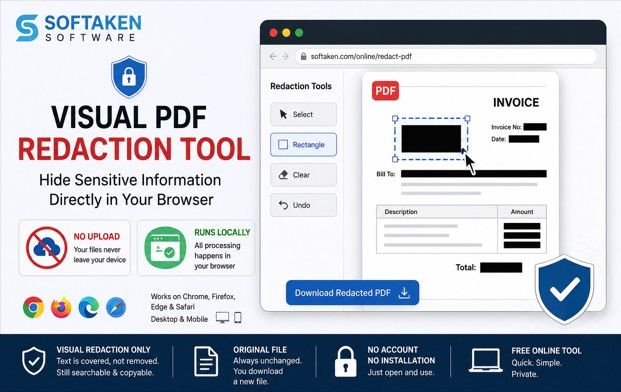
The idea is simple. Upload a PDF, draw black boxes around the sections you want redacted and download the results. Nothing is uploaded to any location. It’s all JavaScript, runs locally on your machine, so the file never leaves your device.
Softaken wanted to be clear about one thing: This isn’t real redaction. The black boxes are at the top of the page visually. But the text below can still be there. Still searchable. Still copyable if someone knows where to look. So it’s okay to have a phone number blurred before you post a screenshot but it’s not something you want to rely on for legal or compliance reasons. To do that, the company points people to its desktop PDF software, which extracts the content.
The Growing Popularity of Browser-Based PDF Tools:
More recently, users have become more suspicious of uploading personal or business documents to online services. PDFs often contain invoices, contracts, identification data, banking information and other sensitive content. Cloud-based tools are convenient, but many users prefer solutions that process files on their local machines for the added privacy and control.
Modern web technologies and advances in JavaScript have made browser-based applications far more powerful. No installations or account creation needed: Tasks that were once performed with desktop software are now done right in a web browser. This has created an increasing need for lightweight tools that can quickly and privately do simple document tasks.
Softaken’s Visual Redaction Tool follows suit, offering simplicity and on-the-user’s-machine processing instead of complex enterprise features. Users can edit quickly, in seconds, and keep their documents on their own devices.
How the tool works:
• Drag and drop a PDF, no account required
• Draw black rectangles on things you want to hide
• Runs entirely in the browser, never sending files to a server
• Download the Original file PDF Edited file unchanged
• Compatible with Chrome, Firefox, Edge, and Safari on desktop and mobile
• Clearly states in the interface this is visual only not secure redaction
Proper Contexts for Visual Redaction:
The tool is designed for informal and quick document sharing situations, the company notes. These include:
• Blurring out phone numbers before posting screenshots online.
• Including account details in invoices submitted for reference purposes.
• Hiding addresses or personal details in demonstration documents.
• Making examples for presentations or training materials.
• Offer sample PDFs to clients but obscure some parts.
For these everyday tasks, visual redaction can save time by bypassing the need to install software or create an online account.
“Basically this is for when you just want to hide something quickly, like blacking out an account number before you share a page,” said a Softaken product rep. “We didn’t want to hype it up as something that it’s not. If you need the text extracted, use a tool designed for that purpose.
What is the Difference Between Visual and Permanent Redaction:
Softaken has also highlighted the significance of knowing the difference between visual redaction and secure redaction.
Visual redaction just puts a black layer over the visible content. The underlying text may still be present in the PDF structure and sometimes can be copied, searched or extracted using specialized tools.
Permanent redaction, in contrast, actually removes the content from the document. This approach is often necessary in legal, regulatory, government and compliance settings where sensitive data has to be fully removed.
Softaken intends to make this distinction clear to help users choose the right tool for their needs instead of assuming that all redaction methods are equally secure.
Simplicity and Accessibility First:
One big reason the company is gathering tools online is to reduce friction for users who only need to do small tasks from time to time, the company says.
Many people need to edit PDF files at least once or twice a month. It might feel like too much work to install dedicated software, sign up for an account, or upload files to third-party servers for simple tasks. A faster alternative is browser-based utilities.
The Visual Redaction Tool expresses this philosophy in:
• No need for registration.
• No downloads of software
• Cross-platform compatibility.
• Supports mobile and desktop
• Fast processing directly in the browser
The company says it will continue to grow its online toolkit with more utilities built on the same privacy-first approach.
It is one of a series of free tools that Softaken has been releasing recently, that are for small everyday tasks that people don’t want to install software or create an account for. The company still offers a full desktop PDF program for those who need more than a quick fix.
The Increasing Significance of Privacy-First Document Processing:
For dealing with digital documents, privacy has become a major concern for both individuals and businesses. And today, many users actively search for tools that minimize the sharing of data, and don’t upload unnecessary data to external servers. People sending a document to a client, posting an example online or preparing files for internal collaboration are more aware of where documents are stored and who might be able to access them.
But Softaken believes that local browser processing answers many of these concerns, giving users more control over their files. Processing happens on the device itself, so users can do some basic editing without signing up for accounts, agreeing to long terms of service and waiting for files to upload and download.
The company says it has developed many of its newer online tools with a privacy-first approach. These tools are not meant to replace the advanced software on your desktop, but to solve small everyday problems as quickly as possible. Softaken aims to provide users with practical solutions to make simple modifications to documents, while also feeling secure that the files are still on their own systems by combining accessibility with local processing.
About Softaken Software
Softaken Software is an Asia based company developing solutions to solve common problems with files and data. Beyond its flagship desktop products it also offers a suite of free online tools that are browser based and cover tasks such as PDF editing, email conversion, data recovery and backup. The goal all along is software that just works, with little config.
Media Contact
Softaken Software
Email: [email protected]
Website: softaken.com
Product Page: https://www.softaken.com/online/redact-pdf/

© 2025 Crivva - Hosted by Airy Hosting Managed Website Hosting.