


If you’ve ever joined an important Zoom call only to freeze mid-sentence, or if you’ve played games online and faced lag spikes that cost you the win, you may have wondered whether to use Wi-Fi or Ethernet. This is a common question when dealing with slow, unstable, or confusing internet issues. With so many internet connection types available today, knowing the difference between Ethernet and Wi-Fi and how Wi-Fi compares to other wireless internet options is more important than ever.
Whether you work from home, stream constantly, game competitively, or manage a smart home, choosing between a wired and wireless network affects your online experience. Let’s simplify it without any tech jargon.
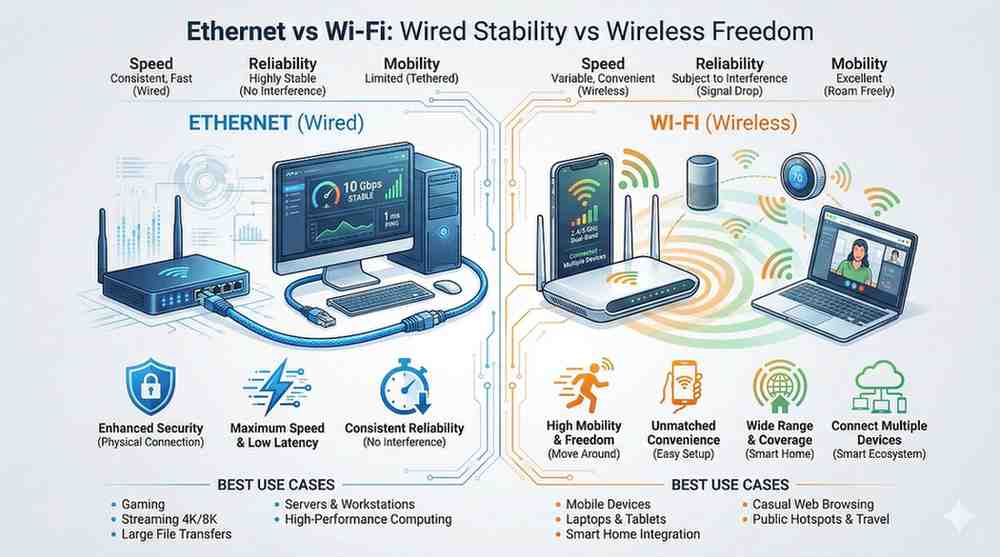
Ethernet is the traditional way to connect to the internet. A physical cable runs from your router to your device. Think of it like a dedicated highway with no traffic, interference, or sudden slowdowns.
If stability is your priority, Ethernet is the clear winner. But it’s not always practical in every room or every home.
Wi-Fi uses radio signals to deliver internet through the air. Unlike Ethernet, you can connect multiple devices without dealing with cables. It’s fast, flexible, and the standard in almost all modern homes.
In short: Wi-Fi gives freedom, not perfection.
Let’s compare them where it actually matters in everyday use.
Most modern Wi-Fi routers advertise impressive speeds, but real-world performance often varies.
Ethernet, on the other hand:
Winner: Ethernet
Comparing a wired network to a wireless one is like contrasting a wired phone call with a walkie-talkie. One offers a steady connection, while the other is less reliable and depends on conditions.
Wi-Fi may drop randomly due to:
Ethernet stays stable no matter what.
Winner: Ethernet
Wi-Fi security relies on encryption and passwords. If it’s not set up correctly, it can be vulnerable. Ethernet requires physical access, which makes it more secure by default.
Winner: Ethernet
This is HUGE for:
Wi-Fi has higher latency and more spikes. Ethernet is low-latency and steady.
Winner: Ethernet
This aspect explains why Wi-Fi dominates modern homes. You can walk, move, or sit outside while using your phone anywhere without plugging in. Ethernet limits movement.
Winner: Wi-Fi
Smart homes depend on Wi-Fi. Smart TVs, thermostats, cameras, speakers, and appliances do not use Ethernet. If you need flexibility, Wi-Fi clearly wins.
Winner: Wi-Fi
Let’s break it down by lifestyle.
Use Ethernet.
Low ping = better performance.
Go Ethernet for:
Wi-Fi is fine for casual browsing.
Wi-Fi is necessary. These devices can’t use cables.
Both work but Ethernet provides zero buffering on 4K content.
Wi-Fi is easier, cleaner, and minimalistic.
Wi-Fi is non-negotiable.
Most modern homes benefit from using both.
You get stability and mobility.
Your type of internet connections also influences performance:
Best speeds. It works exceptionally well with both.
Fast but prone to congestion; Ethernet helps stabilize performance.
Slower overall; Ethernet maximizes what’s available.
Both networks work exceptionally well, but Wi-Fi can face signal changes, adding variability. Whenever possible, choose Ethernet.
High latency no matter what, but Ethernet reduces internal network issues.
Wi-Fi may fluctuate; Ethernet increases internal stability.
Ask yourself:
Often, the best answer is:
👉 Use Ethernet where performance matters most.
👉 Use Wi-Fi where convenience matters.
Choosing between Wi-Fi or Ethernet doesn’t have to be complicated.
If you prioritize speed, stability, and low latency, Ethernet is the better choice.
If you need flexibility, mobility, and minimal setup, Wi-Fi is the winner.
The truth is that most modern homes benefit from both technologies. Ethernet handles heavy tasks while Wi-Fi offers the freedom to use devices anywhere. Understanding these differences will help you create a smoother, frustration-free online experience regardless of how many devices you have or how you use the internet daily.
Yes, Ethernet is generally better for speed, stability, and low latency. It provides a consistent connection ideal for gaming, streaming, or large file transfers. Wi-Fi is more convenient and allows for easier mobility in your home or office.
Wi-Fi is a specific type of wireless internet that connects devices to a router using radio signals. Other types of wireless internet include mobile data networks, fixed wireless broadband, and satellite connections. While all Wi-Fi is wireless internet, not all wireless internet is Wi-Fi.
Definitely. Ethernet reduces lag, minimizes ping spikes, and prevents packet loss that can disrupt online gaming. It offers a more stable and responsive connection compared to Wi-Fi, making it a preferred choice for gamers to ensure smooth gameplay.
Yes, it’s common to use both in many homes and offices. Ethernet works well for stationary devices needing stability, while Wi-Fi supports mobile devices and smart gadgets. A combination of both offers speed and convenience.
Yes, Wi-Fi is suitable for general browsing, emails, and casual video calls. However, for high-quality video conferencing, VPN access, or uploading large files, Ethernet is recommended. It guarantees a stable connection for important work.

© 2025 Crivva - Hosted by Airy Hosting Managed Website Hosting.