

Upgrading hardware does not always improve performance, and the simple reason for this is system mismatch. When you replace a single component with the latest version, such as a CPU or GPU, but the rest of the internal components are not aligned with it, a bottleneck is created in the system. In this situation, the new hardware does not operate at its full capability, due to which overall performance may not improve and can sometimes even drop.
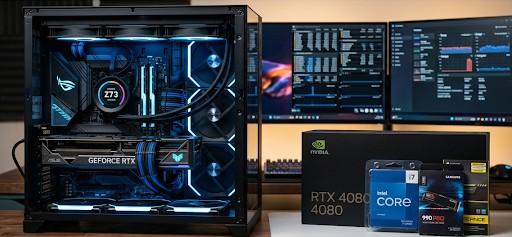
We can also say that performance bottlenecks are systemic, not isolated. For example, installing a high-end GPU such as the NVIDIA GeForce RTX 4090 into a system with an older processor like the Intel Core i5-7400 results in limited gains. The processor cannot supply data quickly enough to utilize the GPU’s full capability, leading to underperformance despite a significant hardware investment.
That is why, instead of upgrading blindly, it is important to evaluate system compatibility first. This is where tools like a bottleneck calculator are helpful, as they identify which component in the system is creating a mismatch. Through this approach, you can perform targeted upgrades and effectively optimize your system performance.
Performance depends as much on software efficiency as on hardware capability. Poorly optimized applications fail to utilize modern hardware effectively, regardless of its specifications.
Operating systems like Windows 11 and Ubuntu manage resources differently, and background processes can consume CPU cycles and memory without contributing to user tasks. In such cases, system cleanup, driver updates, and process management produce more noticeable improvements than hardware upgrades.
Increasing RAM capacity does not automatically translate into better performance. Systems benefit from additional memory only when existing usage approaches or exceeds available capacity.
For instance, upgrading from 16GB to 32GB of RAM shows a minimal difference in everyday tasks such as browsing or document editing. However, workloads involving virtualization, large datasets, or professional software can fully utilize expanded memory. Without such demands, additional RAM remains underutilized.
Replacing traditional hard drives with solid-state drives improves data access speed, but the impact varies depending on workload. While an SSD like the Samsung 970 EVO Plus reduces boot times and application loading delays, it does not significantly enhance compute-heavy tasks such as video rendering or scientific simulations. This distinction highlights that storage upgrades primarily affect data retrieval, not processing capability.
Hardware performance depends on stable operating conditions. Insufficient cooling or power delivery can prevent upgraded components from reaching their intended performance levels.
High-performance processors and GPUs dynamically adjust their speed based on temperature and power availability. Without adequate cooling solutions or a reliable power supply, thermal throttling reduces performance, negating the benefits of upgraded hardware.
Advancements in hardware performance follow a curve of diminishing returns. Each new generation offers improvements, but the difference becomes less noticeable in typical use cases.
Upgrading from a mid-range modern processor to a flagship model may yield measurable benchmark improvements, yet the practical difference in common applications remains marginal. This is especially true for users whose workloads do not push hardware to its limits.
Hardware upgrades introduce dependencies that, if overlooked, can restrict performance. Motherboard compatibility, BIOS support, and interface limitations influence how effectively new components function.
For example, installing a PCIe 4.0 SSD into a motherboard that only supports PCIe 3.0 prevents the drive from reaching its maximum speed. Similarly, outdated firmware can limit the performance of newly installed hardware.
Performance gains depend on whether the upgrade aligns with actual workload requirements. A gaming-focused GPU upgrade does not improve performance in CPU-bound tasks such as compiling code, while a processor upgrade offers little benefit for GPU-intensive rendering workflows.
Effective upgrades require identifying the dominant workload and addressing the component responsible for the primary limitation.
Considering a hardware upgrade as a direct improvement in performance is a common misconception. If you replace only one component without checking the level of the other internal components, a mismatch can be created in the system. Due to this mismatch, bottleneck issues develop, where the new hardware is unable to deliver its full capability, and overall performance may degrade instead of improving.
Effective improvement occurs when the system is evaluated as a whole. Either the components should be at a balanced level, or the upgrade strategy should be planned in a way that ensures compatibility. Through this approach, you can avoid unnecessary upgrades and properly optimize your system efficiency with targeted changes.

© 2025 Crivva - Hosted by Airy Hosting Managed Website Hosting.