You’re in the middle of a video call, and it freezes. Your 4K show buffers right at the best part. Your kid can’t play their online game without lag. Sound familiar?
Most people accept a slow connection, but the real question is whether you actually have a good internet speed for your activities. Are you paying for a service that isn’t delivering?
This guide cuts through the jargon. By the end, you’ll know what counts as a good internet speed in 2026, what you need, and what ‘fast’ really means, without guesswork.
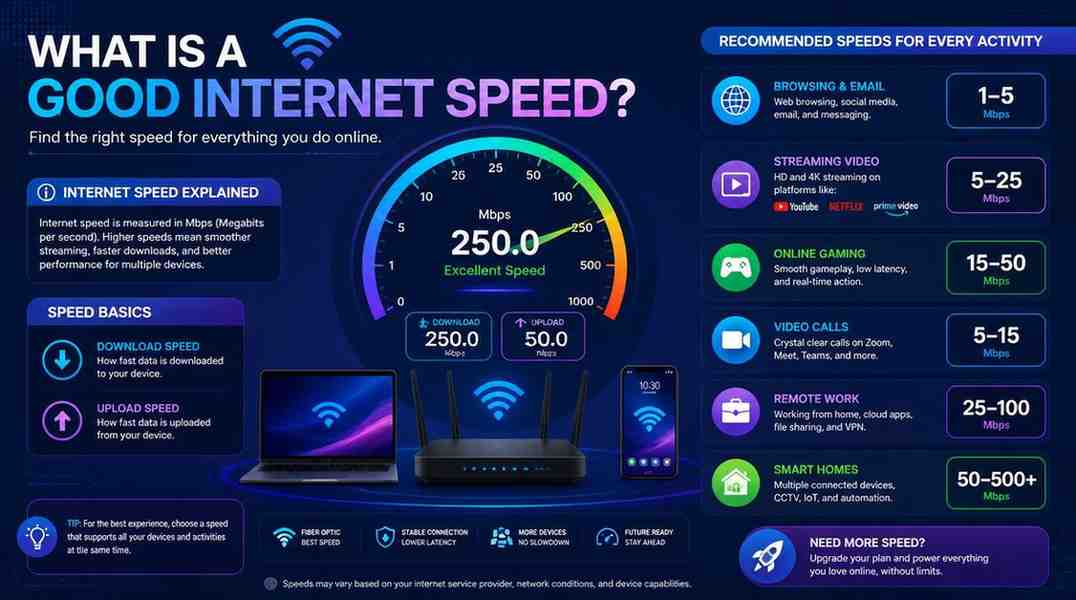
Internet speed is simply how fast data travels between the internet and your device. It’s measured in Mbps (megabits per second) or, increasingly, Gbps (gigabits per second).
There are three core components you’ll hear about:
Most people focus only on download speed, and while it’s important for everyday use, upload speed and latency also matter based on your internet activities.
Quick note: 1 Mbps = 1,000 Kbps. 1 Gbps = 1,000 Mbps. Internet plans are sold in Mbps, so a ‘200 Mbps plan’ means up to 200 megabits of data per second.
A good internet speed depends on your household size and usage, but here’s a straightforward guideline for 2026:
|
Speed Tier |
Download |
Best For |
Rating |
|
Basic |
1–25 Mbps |
Light browsing, email, 1 device |
Minimum |
|
Standard |
25–100 Mbps |
Small households, HD streaming |
Decent |
|
Good |
100–300 Mbps |
3–5 users, 4K streaming, remote work |
Good ✓ |
|
Fast |
300–1,000 Mbps |
Large households, gaming, smart home |
Great |
|
Ultra-Fast |
1 Gbps+ |
Power users, home offices, 8K streaming |
Excellent |
For most households, 100 to 300 Mbps is ideal; it’s fast enough for multiple 4K streams, video calls, and several devices running at the same time without any issues.
The FCC’s current definition of broadband is 100 Mbps download and 20 Mbps upload, updated in 2024. Anything below that is officially considered below standard.
This is where it gets personal. A single person working from home has different needs than a family of five with smart TVs and consoles using the internet simultaneously.
Speed Needed by Activity
|
Activity |
Speed |
Notes |
|
Email & Browsing |
1–5 Mbps |
Per device |
|
HD Streaming |
5–10 Mbps |
Per stream |
|
4K Streaming |
15–25 Mbps |
Per stream |
|
Video Calls |
5–10 Mbps |
Up + Down |
|
Online Gaming |
3–25 Mbps |
Low ping matters more |
|
Smart Home |
1–5 Mbps |
Per device |
Use the Household Estimator
My Household Speed Estimator
Recommended Speed: 38 Mbps
Remember to always add a 20 to 30% buffer to your estimate. Real-world usage rarely runs at perfect efficiency.
Pro tip: The number of connected devices matters as much as your activities. Every smart TV, phone, laptop, tablet, and smart speaker on your network uses part of your bandwidth, even in standby mode.
In 2026, ‘fast’ internet starts at 300 Mbps, and anything above 500 Mbps is genuinely fast by any standard. Gigabit (1,000 Mbps) internet is now available in most urban areas and is considered top-tier.
|
Speed |
Time to Download a 2GB Movie |
Classification |
|
25 Mbps |
~11 minutes |
Slow |
|
100 Mbps |
~2.7 minutes |
Standard |
|
300 Mbps |
~54 seconds |
Fast |
|
1 Gbps |
~16 seconds |
Very Fast |
|
2 Gbps+ |
~8 seconds |
Ultra Fast |
That said, faster isn’t always better if you live alone or have light usage. Paying for gigabit internet when you only browse and stream HD video is like buying a sports car just to drive to the store; it’s technically fine but unnecessary.
Upload speed is often the forgotten half of the equation. Historically, plans offered much lower upload speeds than download speeds, sometimes up to 10 times lower. However, with the rise of remote work, live streaming, and cloud storage, upload speed has become critical.
A good upload speed in 2026 is at least 20 to 50 Mbps for most households. If you’re a content creator or run a home server, aim for an upload speed of 100 Mbps or more.
Download speed is what most people actually experience daily. It affects how quickly your YouTube videos load, how smoothly your Netflix streams play, and how fast your game updates download.
|
Use Case |
Minimum |
Recommended |
|
Email & social media |
1 Mbps |
5 Mbps |
|
HD video streaming |
5 Mbps |
15 Mbps |
|
4K / UHD streaming |
15 Mbps |
25 Mbps |
|
Online gaming |
3 Mbps |
25 Mbps |
|
Remote work / video calls |
10 Mbps |
50 Mbps |
|
Family of 4–5 (mixed use) |
100 Mbps |
200–300 Mbps |
For a single person, 100 Mbps download speed is more than adequate. For a busy household of 4 to 6 people with multiple devices, 300 Mbps or more keeps everything running smoothly without anyone noticing slowdowns.
Bottom line: A good download speed for a typical 2026 household is 100 to 300 Mbps. That range supports 4K streaming, video calls, gaming, and remote work simultaneously.
There’s no single answer; it depends on your household and how you use the internet. But here’s the clearest summary:
For most people in 2026, 100 to 300 Mbps is a good internet speed. It handles 4K streaming, remote work, gaming, and multiple devices without breaking a sweat.
If you’re a solo user with light habits, even 25 to 50 Mbps can work. If you have a big household with heavy usage, aim for 500 Mbps or more.
Whatever your plan, the best way to know if you have a good internet speed is simple: run a speed test, compare your result to the benchmarks in this guide, and see if you’re getting what you’re paying for.
Yes, 100 Mbps is a good speed for most households. It comfortably supports 4K streaming on multiple devices, video calls, gaming, and several connected devices at once. For a single user or couple, it’s more than enough. For a larger family with heavy use, you might want to upgrade to 200 to 300 Mbps.
For reliable remote work, aim for at least 25 Mbps download and 10 Mbps upload. However, 50 to 100 Mbps is more comfortable if you’re on frequent video calls, uploading large files, or sharing the connection with others. The upload speed is especially important for clear, uninterrupted video conferencing.
For online gaming, download speed is less critical than you might think; most games need only 3-25 Mbps. What really matters is low latency (ping). A ping under 20 ms is excellent, under 50 ms is good, and over 100 ms you’ll notice lag. A stable connection of 50-100 Mbps with low latency is ideal for most gamers.
Streaming 4K video requires about 15-25 Mbps per stream, depending on the platform. Netflix recommends 15 Mbps for 4K, while YouTube suggests 20 Mbps. If multiple users in your household are streaming 4K at the same time, multiply accordingly and add extra bandwidth for other connected devices.
Several factors can slow you down despite a fast plan: Wi-Fi signal quality, router age and placement, network congestion during busy hours, the number of connected devices, or outdated hardware. Run a wired speed test directly from your router to see your true speeds. If they’re far below your plan speed, contact your provider. If wired speeds are fast but Wi-Fi is slow, upgrading your router or adding a mesh system usually fixes the problem.

© 2025 Crivva - Hosted by Airy Hosting Managed Website Hosting.