


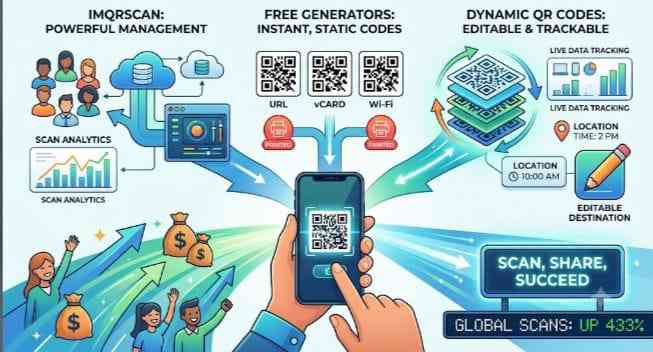
From static squares to living links — here’s everything you need to know about generating, managing, and maximising QR codes in 2024 and beyond.
Digital Tools Guide · June 2025 · 8 min read
Introduction: Why QR Codes Are More Relevant Than Ever
The humble QR code has undergone a remarkable transformation. Once dismissed as a niche novelty, it is now a cornerstone of digital marketing, restaurant menus, product packaging, event ticketing, and contactless payments. Global QR code scans have grown by over 433% since 2022, and that figure continues to climb.
Whether you are a business owner, marketer, or simply a curious individual, understanding the tools available — from IMQRScan to free online QR generators — and grasping the power of dynamic QR codes can fundamentally change how you connect with your audience.
What is IMQRScan?
IMQRScan is a comprehensive QR code management platform designed for businesses and individuals who need more than just a basic scanner. It bridges the gap between code generation, scanning analytics, and campaign tracking — all under one roof.
Key features of IMQRScan
Multi-format support — scan and generate codes for URLs, vCards, Wi-Fi, SMS, email, and more
Scan history and analytics — track when, where, and how often your codes are scanned
Bulk QR generation — create hundreds of unique codes from a data file in minutes
Custom branding — embed logos, adjust colours, and match your brand identity
Cross-platform compatibility — works seamlessly on iOS, Android, and desktop browsers
Pro Tip: IMQRScan is particularly valuable for retail and event management use cases where real-time scan data helps teams make immediate decisions about foot traffic, engagement, and campaign performance.
Who should use IMQRScan?
IMQRScan is ideal for small-to-medium businesses, event organisers, digital marketers, and developers who want a reliable, feature-rich environment for their QR code strategy.
What is a Free Online QR Code Generator?
A free QR code generator is a web-based tool that converts any piece of data — a URL, a phone number, a PDF, plain text — into a scannable QR code image, instantly and without cost. These tools require no account, no software download, and no technical knowledge.
Popular types of QR codes you can generate for free
URL / Website QR codes — direct users to any webpage
vCard QR codes — share contact information digitally
Wi-Fi QR codes — let guests connect without typing a password
PDF QR codes — link directly to downloadable documents
Social media QR codes — grow your following offline
Payment QR codes — enable fast, contactless transactions
What to look for in a free generator
Not all free tools are equal. The best free QR code generator platforms offer high-resolution PNG and SVG downloads, basic customisation options (colours and shapes), no watermarks, and fast generation with no sign-up required. Look for tools that also allow a reasonable degree of design customisation — a branded code is scanned 35% more often than a plain black-and-white version.
Important Note: Free generators typically produce static QR codes. This means the destination is permanently encoded. If you need to change the destination after printing, you will need a dynamic QR code solution instead.
Static vs Dynamic: What’s the Difference?
This is the most important distinction in the QR code world. A static QR code encodes the destination directly into the pattern — change the destination and the code becomes useless. A dynamic QR code encodes a short redirect URL that points to a server. The server then redirects the scanner to the actual destination — which you can update at any time, from any device.
Why Dynamic QR Codes are a Game-Changer
Edit destination anytime — update the linked URL without reprinting materials
Advanced analytics — track total scans, unique scans, device type, OS, city, and time of scan
A/B testing — rotate between multiple landing pages to optimise conversions
Geo-targeting — show different content to users in different countries or regions
Time-based redirects — display different pages depending on the time of day or date
Password protection — restrict access to sensitive content
Top Use Cases for Dynamic QR Codes
Packaging and print advertising: A product label with a dynamic QR code can link to seasonal promotions, updated manuals, or new video content — without changing the physical label.
Restaurant menus: The global shift to contactless dining has made dynamic menu QR codes essential. Prices and dishes can be updated instantly, reducing printing costs dramatically.
Event management: A single event QR code can redirect attendees to the schedule, live stream link, or post-event survey — all using the same printed badge.
Real estate: Property listings on flyers can be refreshed in real time, showing live availability and updated pricing without reprinting thousands of brochures.
Choosing the Right QR Tool for Your Needs
The right choice depends on your use case:
Need a quick, one-off code with no tracking? → Use a free online QR generator
Need scanning analytics and brand management? → Use IMQRScan
Need editable, trackable, campaign-ready codes? → Use a dynamic QR code generator
Deploying QR codes successfully requires more than just generating a functional link; it demands careful attention to design, placement, and user experience. To ensure maximum scan rates and flawless technical performance, keep the following industry-standard best practices in mind before sending any campaign to print:
Maintain Sharp Visual Contrast: Always ensure there is a stark, high-contrast distinction between the foreground data pixels and the background surface. While modern generators allow beautiful color customizations, a dark foreground (such as deep navy, charcoal, or classic black) against a crisp white or light background ensures that mobile camera sensors can instantly differentiate the data matrix elements.
Observe the Minimum Size Rule: Never shrink your physical QR graphic below 2 \times 2 \text{ cm} (0.8 \times 0.8 \text{ inches}) for standard printed marketing collateral like business cards, brochures, or flyers. If your target audience is scanning the image from a distance—such as a billboard, storefront window, or large event banner—the dimensions must scale upward proportionally to match the average scanning distance.
Incorporate a Direct Call-to-Action (CTA): A naked QR code floating alone on a page drastically reduces user interaction. Always frame your graphic with clear, action-oriented instructional text nearby, such as “Scan to View Our Menu,” “Scan for a 15% Discount,” or “Scan to Download the App.” Giving users an immediate incentive drives significantly higher engagement.
Test Across Multiple Devices Before Printing: Before committing to a mass printing run of thousands of copies, display your generated graphic on a digital screen and test it using multiple different smartphone models, older hardware variations, and various operating systems. Test scanning it under low-light environments and at obscure angles to guarantee the destination routing works flawlessly for everyone.
Even with the best tools, creators often encounter unexpected hurdles when deploying their codes out in the wild. Understanding how to preemptively troubleshoot these issues can save your campaign from underperforming. If your audience reports difficulties scanning your graphics, the culprit is almost always tied to one of three common environmental or digital factors.
Fixing Blurred Resolution: When you export graphics from an online tool, ensure you select a vector format like SVG or a high-resolution PNG. Low-resolution images will pixelate when printed on larger materials, confusing smartphone camera sensors.
Managing Complex Data Patterns: If you notice your static code pattern looks incredibly dense and crowded, it is trying to hold too much data. To fix this, shorten your target URL using a link shortener, or switch directly to a dynamic code structure to keep the pixel matrix clean, open, and incredibly fast to scan.
Accounting for Bad Lighting: Physical placement heavily impacts user success. Avoid placing your graphics on highly reflective, glossy paper or behind glass windows where bright sunlight can cause harsh glares. Matte finishes are universally preferred for smooth, seamless scanning.
Embodying the Future of Digital Connectivity
In an increasingly mobile-first digital landscape, tools like IMQRScan are no longer just optional luxuries—they are essential assets for modern digital marketing strategies, operational business efficiency, and seamless information sharing. By bridging the massive physical gap between offline interactions and digital landing pages, QR codes have fundamentally transformed how modern businesses, independent creators, and daily consumers interact. Whether you are a grassroots startup needing a free static code to link to a basic contact page, or an enterprise manager handling a multi-tiered commercial campaign demanding intense real-time tracking data, selecting the proper generation infrastructure is the defining key to your overall engagement success.

© 2025 Crivva - Hosted by Airy Hosting Managed Website Hosting.