

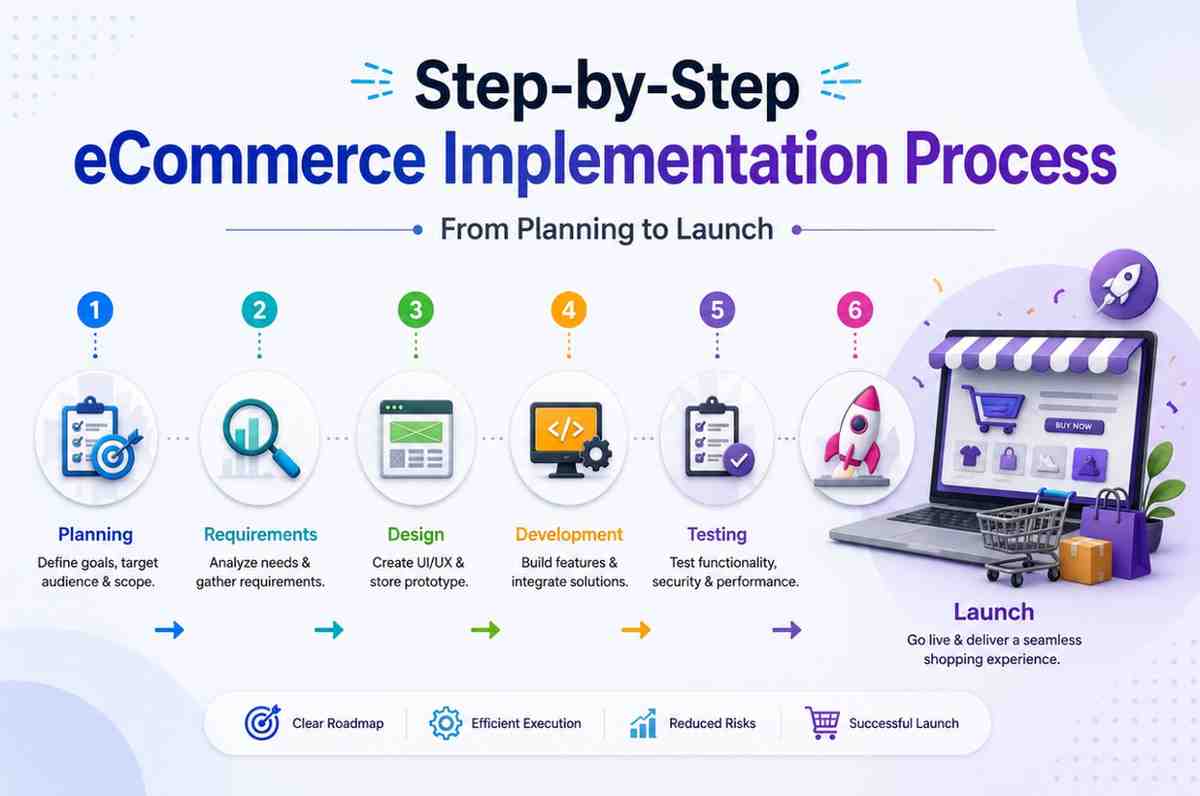
Launching an online store is exciting, but without a clear process, it can quickly turn into a stressful mess of missed deadlines, broken integrations, and last-minute surprises. The difference between a smooth launch and a chaotic one almost always comes down to one thing: a well-structured implementation process.
Whether you’re building your first online store or migrating from an outdated platform, knowing what happens at each stage helps you plan better, set realistic timelines, and avoid the common pitfalls that derail eCommerce projects. In this guide, we’ll walk through the entire process step by step, from initial planning to going live and beyond.
eCommerce projects rarely fail because of bad ideas; they fail because of poor planning and execution. Data migration alone is one of the riskiest parts of any platform launch or replatform: industry research on replatforming shows that a large majority of data migration projects either fail outright or run over budget, with integration complexity, SEO preservation, and timeline management adding further risk along the way.
That doesn’t mean implementation has to be risky for your business. It means it needs structure. A clear, phased process turns a complicated project into a series of manageable steps, each with its own goals, deliverables, and checkpoints.
This is exactly the kind of structured approach a professional eCommerce implementation services provider follows, breaking a large, intimidating project into clear, trackable stages so nothing gets missed.
Every successful implementation starts with understanding the business behind the store, not just the store itself.
In this phase, the implementation team typically works with you to understand:
This stage also includes a technical audit if you’re migrating from an existing platform. The team reviews your current data quality, integrations, and any custom features that need to be replicated or improved.
Why this step matters: Skipping discovery is one of the most common reasons projects go over budget or miss deadlines. You can’t plan a realistic timeline or budget without first understanding the full scope of work.
Once requirements are clear, the next step is choosing the right eCommerce platform. This decision shapes everything that follows: your budget, your timeline, and your long-term flexibility.
Common platform considerations include:
An experienced eCommerce implementation company will recommend a platform based on your catalog complexity, expected traffic, integration needs, and budget, not just what’s currently trending.
With a platform chosen, the project moves into detailed planning. This is where the team creates:
Before any code is written, the structure and flow of the store need to be mapped out. This includes:
This is where the platform itself starts coming together. The implementation team configures:
For straightforward stores, much of this configuration uses built-in platform tools. For more complex businesses, custom development is needed to support unique pricing models, B2B portals, or subscription-based selling.
If your business needs features beyond what the platform offers out of the box, this is where custom development happens. Common examples include:
This phase often runs in parallel with store setup, with developers building features while configuration and design work continues elsewhere.
If you’re moving from an existing store, data migration is one of the most delicate steps in the entire process. It typically involves transferring:
This step carries real risk if rushed. Research cited by Forbes found that only a small minority of data migrations land within their forecasted budget and even fewer stay on schedule, which is why experienced teams build in extra time and run multiple test migrations before the final cutover. A phased approach, migrating in stages and validating data at each step, significantly reduces the chance of lost records or broken links.
Modern eCommerce rarely runs in isolation. Most businesses need their store connected to other systems, such as:
Before launch, the store goes through rigorous testing to catch issues while they’re still cheap and easy to fix. Testing typically covers:
A new platform is only as good as your team’s ability to use it. Training typically covers:
With testing complete and the team trained, it’s time to go live. A well-planned launch typically includes:
Implementation doesn’t end the moment your store goes live. The weeks following launch are critical for:
While every project is different, here’s a general sense of how long each phase tends to take for a mid-sized eCommerce implementation:
|
Phase |
Typical Duration |
|
Discovery & Planning |
1–3 weeks |
|
Platform Selection |
1–2 weeks (often overlaps with discovery) |
|
Design & UX |
2–4 weeks |
|
Development & Configuration |
4–10 weeks |
|
Data Migration |
2–6 weeks (varies widely by data volume) |
|
Integrations |
2–4 weeks (often parallel to development) |
|
Testing & QA |
2–3 weeks |
|
Training & Launch Prep |
1–2 weeks |
For straightforward stores on platforms like Shopify, the full process might take two to three months. For complex, multi-integration enterprise projects, six months or longer is common. The reality, as research into replatforming projects confirms, is that businesses citing scalability limits as their main frustration are common, and most who complete a well-planned migration report real revenue improvements afterward, which is the whole point of going through the process properly.
A successful eCommerce implementation isn’t about rushing to launch; it’s about following a structured process that reduces risk at every stage. From discovery and platform selection through data migration, integrations, testing, and training, each step builds the foundation for a store that actually works the way your business needs it to.
Trying to shortcut these steps or relying on a single developer to handle a project that needs full implementation expertise is one of the most common reasons online stores struggle after launch. Partnering with an experienced eCommerce implementation company that understands this entire lifecycle, not just the coding, gives your project the structure and accountability it needs to launch successfully and scale with confidence.
Q: How long does a typical eCommerce implementation take?
Most projects take two to six months, depending on catalog size, the number of integrations needed, and whether data migration from an existing platform is involved.
Q: What’s the riskiest part of the implementation process?
Data migration is widely considered the highest-risk phase, since moving products, customer records, and order history without errors requires careful planning, testing, and validation.
Q: Do I need a different process if I’m starting fresh versus migrating from another platform?
The core steps are similar, but migrations add extra work around data transfer, SEO preservation, and redirect mapping that isn’t necessary for a brand-new store.

© 2025 Crivva - Hosted by Airy Hosting Managed Website Hosting.