


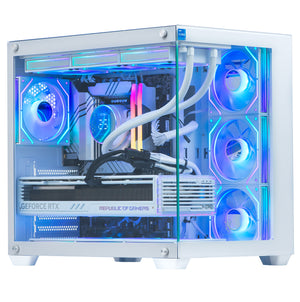
Choosing the right gaming pc in 2026 can feel overwhelming. With so many options available, from entry-level systems to high-end performance machines, it’s essential to understand how key components like the GPU, CPU, and RAM impact your gaming experience. Whether you’re a casual gamer, competitive esports player, or content creator, selecting the right configuration ensures smooth gameplay, higher frame rates, and long-term value.
In this guide, we’ll break down everything you need to know about choosing the perfect gaming pc, while also highlighting a budget-friendly option that delivers solid performance for everyday gaming.
A well-balanced gaming pc is the foundation of a great gaming experience. If one component is too weak, it can bottleneck the entire system. For example, a powerful GPU paired with a weak CPU may result in lower FPS, while insufficient RAM can cause stuttering and slow load times.
That’s why understanding the role of each component is crucial before making a purchase.
The GPU is the most important component in any gaming pc. It determines how well your system can render graphics, handle high resolutions, and maintain smooth frame rates.
Entry-Level GPUs (e.g., GTX 750 / GTX 1650): Suitable for older or less demanding games at 720p–1080p
Mid-Range GPUs (e.g., RTX 3060 / RTX 4060): Ideal for modern games at high settings in 1080p and 1440p
High-End GPUs (e.g., RTX 4070 and above): Designed for 4K gaming and ultra settings
If you’re playing esports titles like Fortnite or Valorant, a mid-range GPU is more than enough. However, for AAA titles like Cyberpunk 2077, you’ll need a more powerful GPU.
The CPU is the brain of your gaming pc. It handles game logic, physics, AI, and background processes.
Core Count: Modern games benefit from 4–8 cores or more
Clock Speed: Higher speeds improve single-thread performance
Generation: Newer CPUs are more efficient and powerful
For gaming, a balanced CPU ensures your GPU performs at its full potential without bottlenecks.
RAM plays a crucial role in multitasking and game performance. It allows your gaming pc to run games smoothly while handling background applications.
8GB RAM: Minimum requirement for basic gaming
16GB RAM: Ideal for most modern games and multitasking
32GB RAM: Best for streaming, editing, and heavy workloads
Faster RAM (DDR4 or DDR5) also improves performance in certain games.
While GPU, CPU, and RAM are critical, storage also impacts your overall experience.
SSD (Solid State Drive): Faster load times and better system responsiveness
HDD (Hard Disk Drive): More storage at a lower cost
A combination of SSD (for OS and games) and HDD (for storage) is often the best setup.
When choosing a gaming pc, your budget will play a major role. The key is to balance performance across all components rather than overspending on one part.
Entry-Level Budget: Focus on basic gaming performance
Mid-Range Budget: Aim for smooth gameplay in modern titles
High-End Budget: Target ultra settings and future-proofing
If you’re looking for a budget-friendly gaming pc, the Nova Gaming PC Bundle – Intel Core i5 3rd 16GB Nvidia GTX 750 4GB nv-ms105 is a solid entry-level option.
Intel Core i5 3rd Generation processor
16GB RAM for smooth multitasking
Nvidia GTX 750 4GB graphics
Complete bundle setup for convenience
This system is ideal for:
Casual gamers
Students and beginners
Esports titles like CS:GO, Valorant, and Fortnite (low to medium settings)
Everyday computing and light content creation
While it may not handle the latest AAA games on ultra settings, it offers great value for those starting their gaming journey or looking for an affordable setup.
When investing in a gaming pc, it’s important to think beyond your current needs. Games are becoming more demanding every year, with better graphics, larger open worlds, and advanced AI features. Choosing a system with upgrade potential such as extra RAM slots, a modern motherboard, and a compatible power supply ensures you can enhance your setup over time instead of replacing it entirely. Even if you start with an entry-level system like the Nova Gaming PC Bundle, having the flexibility to upgrade your GPU or storage later can significantly extend the lifespan of your gaming PC and save money in the long run.
Here are some practical tips to help you choose the best gaming pc:
Are you playing esports games or AAA titles? Your choice of GPU and CPU should match your usage.
Choose a system that allows future upgrades like adding more RAM or upgrading the GPU.
Good cooling ensures long-term performance and stability.
Gaming PC bundles can save money by including monitors, keyboards, and accessories.
Always purchase from reputable brands or retailers to ensure quality and support.
Choosing a powerful GPU with a weak CPU
Buying less than 16GB RAM for modern gaming
Ignoring upgrade potential
Focusing only on price instead of performance
Avoiding these mistakes will help you get the most value from your gaming pc.
Choosing the right gaming pc doesn’t have to be complicated. By understanding the importance of GPU, CPU, and RAM, you can make a smart investment that delivers smooth gameplay and long-term performance.
The Nova Gaming PC Bundle – Intel Core i5 3rd 16GB Nvidia GTX 750 4GB nv-ms105 is a great starting point for gamers who want affordability without sacrificing essential performance.
Ready to find the perfect gaming PC for your needs? Explore our latest deals and discover powerful systems tailored to every budget.
Contact us now and take the first step toward building your ultimate gaming experience.

© 2025 Crivva - Hosted by Airy Hosting Managed Website Hosting.