

Ever noticed your internet slowing down right when you need it the most, during an important video call, while streaming your favorite show, or uploading a file? You’re not alone. Many people blame their internet provider, but the real problem often lies in the corner: your router.
Understanding the common router issues that affect your internet speed can save you time, frustration, and even money. Let’s break down what’s really happening behind the scenes and how you can fix it.
Your router is the heart of your home network. It takes the internet signal from your ISP and distributes it to every device, including your phone, laptop, smart TV, and more.
But here’s the catch: if your router isn’t working well, your entire internet experience suffers, no matter how fast your plan is.
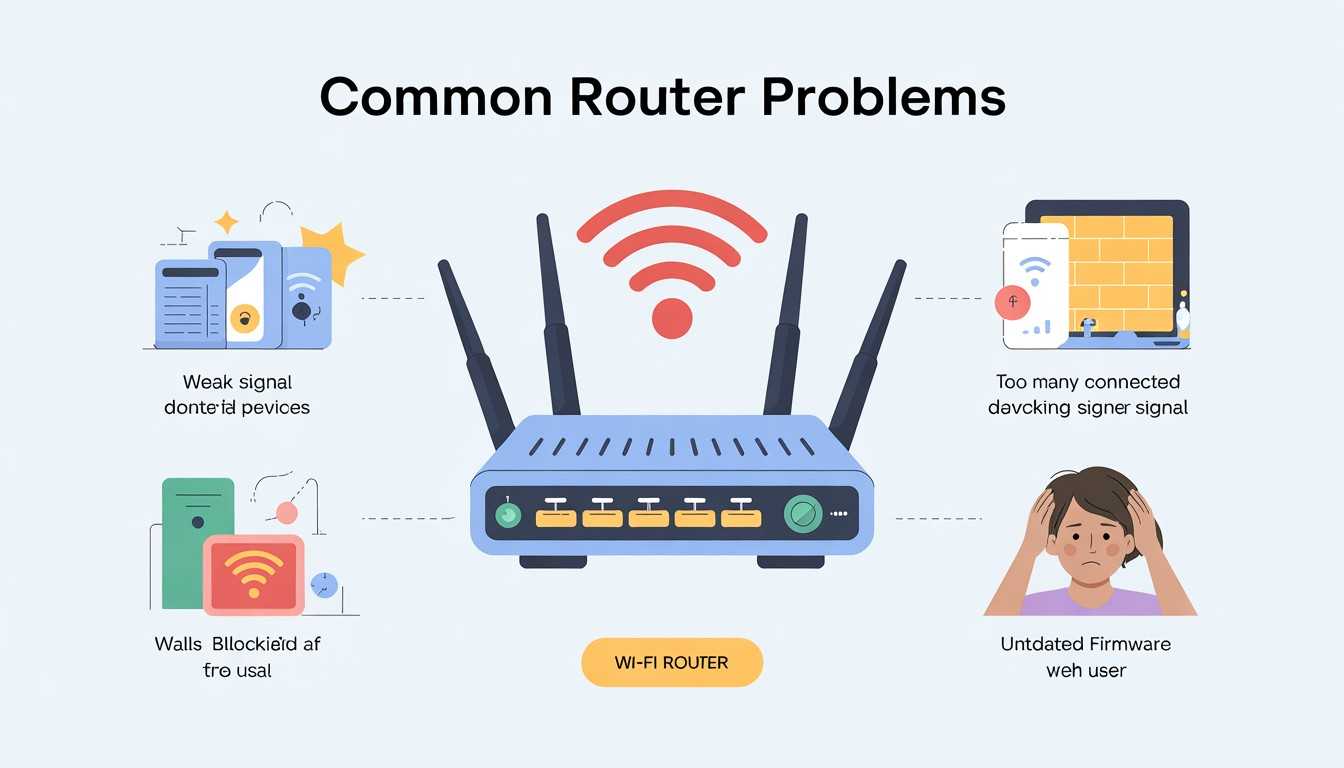
You may be paying for high-speed internet, but you are still facing buffering, lag, and slow downloads. These are common router problems that can impact your connection.
One of the most common reasons for slow Wi-Fi, which is often overlooked, is simply where your router is located.
The Problem: Routers broadcast signals in all directions, but those signals weaken when they go through walls, furniture, or travel long distances.
If your router is:
…you’re unintentionally reducing your Wi-Fi speed and coverage.
The Fix
Sometimes, just moving your router a few feet can greatly improve your connection.
Just like smartphones and laptops, routers don’t stay “fast” forever.
The Problem: Older routers weren’t made for today’s internet needs. Think about multiple devices, streaming, gaming, and smart home setups all running at the same time.
They might also not support new standards like Wi-Fi 5 or Wi-Fi 6, which provide faster speeds and better performance.
The Fix
If your internet plan is fast but your router is outdated, you aren’t getting what you’re paying for.
Too many devices can overwhelm your router.
The Problem: In today’s connected homes, it isn’t just your phone or laptop using the internet. Smart TVs, gaming consoles, tablets, security cameras, and even smart home devices constantly compete for bandwidth. The result is slower speeds, buffering videos, and frustrating lag, especially during busy times.
The Fix:
This issue becomes more important in homes with a lot of streaming, gaming, or work-from-home usage.
Your Wi-Fi signal isn’t alone, it’s competing for space.
The Problem: Wi-Fi signals can easily be disrupted by everyday electronics like microwaves, cordless phones, baby monitors, and even neighboring networks. This is especially common on the crowded 2.4 GHz band, causing unstable connections and slower speeds.
The Fix:
Even small changes can greatly enhance your connection’s speed and reliability.
Your router isn’t just hardware; it runs on software too. Like your phone or computer, it needs regular updates to perform well.
The Problem: Outdated firmware can cause bugs, security risks, and noticeable drops in performance. Sometimes, it may even lead to random disconnections or slow speeds.
The Fix:
Takeaway: Keeping your router updated is one of the easiest ways to improve speed, stability, and security all at once.
It might be surprising, but routers can overheat. When they do, your internet performance suffers.
The Problem: Excess heat can slow down your router, reduce performance, or even cause it to shut off temporarily to avoid damage.
The Fix:
Takeaway: A cool router is a reliable router. Proper airflow can greatly boost performance and lifespan.
The Problem: If your Wi-Fi feels unusually slow, it might not just be a technical problem; someone else could be using your network. Unauthorized users can silently consume bandwidth, leaving you with sluggish speeds and frustrating buffering.
The Fix:
Why it matters: Securing your network doesn’t just protect your data; it ensures your bandwidth is used only by you, keeping speeds consistent and reliable.
The Problem: The default router settings are designed for general use, not for your specific home, devices, or internet habits. This can lead to poor performance, especially with multiple users or heavy applications.
The Fix:
Why it matters: Small configuration changes can unlock significantly better performance, turning an average connection into a fast and efficient one.
The Problem: Your Wi-Fi might not be the issue; your devices could be. Many apps run quietly in the background, performing updates, syncing files to the cloud, or downloading data without you noticing. Over time, this can eat up your bandwidth and slow everything down.
The Fix:
Why it matters: Freeing up hidden bandwidth ensures your internet is used for what really matters, whether it’s streaming, gaming, or work calls.
The Problem: It may seem basic, but routers aren’t meant to work flawlessly forever. Over time, they can develop memory glitches, overheating issues, or minor software bugs that reduce performance.
The Fix:
Why it works: A simple reboot clears temporary errors and refreshes your connection, often improving speed and stability instantly.
Before blaming your internet provider, it’s worth checking your router. Many connectivity issues actually start inside your home.
Ask yourself:
If you answered “yes” to any of these questions, there’s a strong chance your router is the bottleneck.
Pro Tip: When to Upgrade vs. Troubleshoot Your Wi-Fi Router
Not every slow internet issue means you need a new router, but sometimes you really do. The key is knowing when to fix it and when to replace it.
It’s time to upgrade if your router is:
Stick to troubleshooting if the issue is minor:
Bottom line: Don’t rush to replace your router. Try quick fixes first, but if performance issues keep happening, upgrading can dramatically improve your internet experience, especially in a home with many devices.
Slow internet isn’t always your provider’s fault. Often, common router issues that affect your internet speed are the real problem. The good news is that most of these issues are easy to fix.
From poor placement and outdated hardware to interference and overcrowded networks, understanding these issues puts you back in control of your connection. With a few adjustments, you can enjoy faster, more reliable internet without changing your plan.
Your router may be outdated, poorly placed, or overloaded with devices, which can limit your actual speed.
Restarting your router once a week helps maintain good performance.
Yes, multiple connected devices can cause network congestion and reduce speed.
Absolutely. A centrally located, elevated router provides better coverage and faster speeds.
If your router is over 4 to 5 years old or struggles with modern usage, it’s time to upgrade.

© 2025 Crivva - Hosted by Airy Hosting Managed Website Hosting.