


It can be difficult to convert old emails into Office 365, particularly if your messages are saved as MSG files. When attempting to view or convert MSG files directly, many people encounter problems, including incomplete conversions, missing attachments or damaged formatting. Maintaining the security and organisation of your email data in the new setting is challenging due to these issues.
Fortunately, there are trustworthy ways to convert MSG files into Office 365 without losing anything crucial. This blog will describe what MSG files are, why users encounter problems during the MSG to Office 365 Conversion, and how to resolve those issues using both manual procedures and an automated application, the MSG to Office 365 Converter.
Microsoft Outlook creates MSG files, which are single-message files. A single email, the sender, recipient, subject line, message body, attachments, and formatting are all included in each MSG file. These files are useful for sharing or storing specific messages outside of Outlook.
But when consumers switch to Office 365 (also known as Microsoft 365), issues start to arise. Office 365 does not directly enable converting MSG files and keeps emails in the cloud. You are unable to upload them directly or drag and drop them into your mailbox. Because of this, formatting, attachments, and organisational structure are frequently lost during the conversion.
A few problems can arise if you attempt to convert MSG files manually or employ shaky techniques.
It is challenging to maintain your original email data because of all these problems. Because of this, converting MSG files into Office 365 requires caution.
You can follow these steps if you wish to try a manual method with a few MSG files.
Step 1 — Launch Outlook on your computer.
Verify that your Office 365 account is linked to Outlook. It will serve as a link between your Office 365 mailbox and MSG files.
Step 2 — In Outlook, make a new folder
Make a new folder in your mailbox. Give it a name like MSG convert. This aids in maintaining organisation.
Step 3 — Drag and drop MSG files
Proceed to the MSG files folder on your computer. Drag the files you wish to convert into the new Outlook folder after selecting them.
Step 4 — Examine your Office 365 mailbox
If your account is active and online, the MSG files will immediately sync with your Office 365 inbox whenever you drag them into Outlook. To verify the conversion, check your mailbox in the online version of Office 365.
Step 5 — Check the formatting and attachments
Check that the formatting and attachments are intact by opening a few emails after synchronising.
For modest groups of MSG files, this technique is effective. However, if you have thousands or hundreds of messages, it is not appropriate. The manual method takes a lot of time and is prone to human mistakes. It frequently overlooks attachments in large conversions and struggles with corrupted files.
Using a specialised application is the best option if you want to convert MSG files into Office 365 more quickly, reliably, and error-free. This is precisely the goal of the DataVare MSG to Office 365 Converter.
This application converts MSG files straight into Office 365 without changing the attachments, text, or formatting of emails. It is powerful enough for business users who oversee significant MSG to Office 365 conversion, but it is also easy enough for novices.
Key Features
This is why the tool is unique.
1. Preserves attachments and formatting
Your email text formatting, inline graphics, signatures, and attachments are all left intact. Your communications will appear in Office 365 exactly as they did in Outlook.
2. Convert directly into Office 365
Your Office 365 account is immediately connected to the tool. You do not have to convert files into another format or go through several processes.
3. Conversion in batches
Multiple MSG files or entire folders can be uploaded and converted simultaneously. Time is saved, and reliable outcomes are guaranteed.
4. A straightforward and user-friendly interface
You are guided step-by-step through the procedure by the tool clear design. The conversion is simple to finish, even for non-technical individuals.
5. Compatible with any Outlook version
The application works with MSG files from both older versions, such as Outlook 2003, and more recent versions, such as Outlook 2021.
6. No corruption or loss of data
Email integrity is fully preserved by the application. Every detail is kept, including metadata and topic lines.
7. Data privacy and secure login
Your Office 365 login information is never shared or kept. The conversion procedure is private and safe.
How to Use
The procedures are quick and easy.
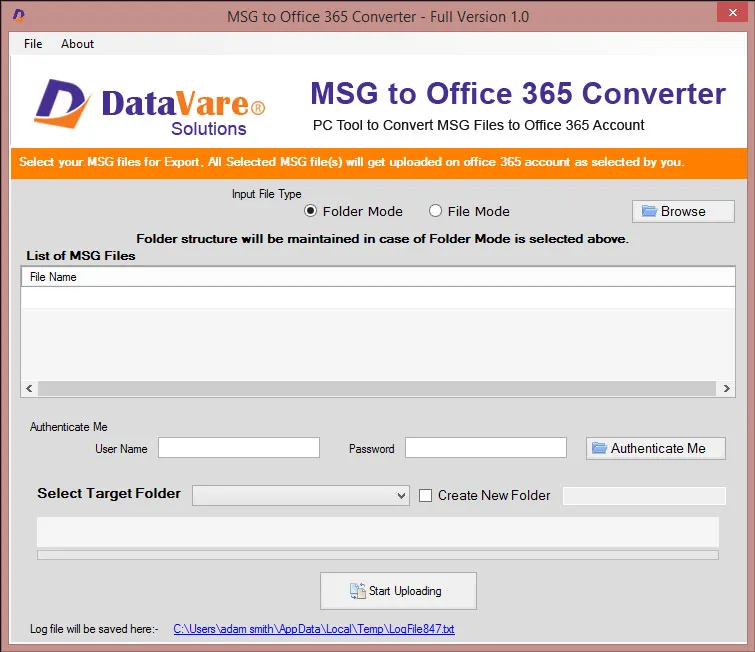
You can examine the converted emails by logging into your Office 365 account after the process is complete. Everything will look just as it did, including the attachments and formatting.
Benefits of Using This Tool
Automates the conversion procedure to save time.
Minimises human error in large-scale conversion
Works for both individuals and companies.
Guarantees the preservation of all email components
Does not slow down when handling huge MSG folders.
Anyone switching to Office 365 for personal or professional communication will find the product perfect. It guarantees that after conversion, every message, attachment, and layout stays the same.
It is not hard to convert MSG files to Office 365. Manual approaches are effective for a few emails, but they lose their dependability when the volume is high. Using a professional tool like the MSG to Office 365 Converter is the safest and most effective approach to preserve formatting and attachments.
It streamlines the procedure, saves time, and provides assurance that your crucial data is converted securely. This application lets you finish tasks efficiently and precisely, whether you are updating your email system or combining outdated archives.
Do not worry about losing important emails or attachments when you switch to Office 365. Your communication history will always be comprehensive, well organised, and accessible from anywhere at any time, thanks to the software solution.

© 2025 Crivva - Hosted by Airy Hosting Managed Website Hosting.








