You’re at a coffee shop, a train station, or your friend’s house, and there’s no reliable Wi-Fi around. Your laptop needs a connection, your tablet is offline, and the public network seems questionable. Does this sound familiar? This is exactly the problem a mobile hotspot solves. Once you understand how it works, you’ll wonder how you ever managed without it.
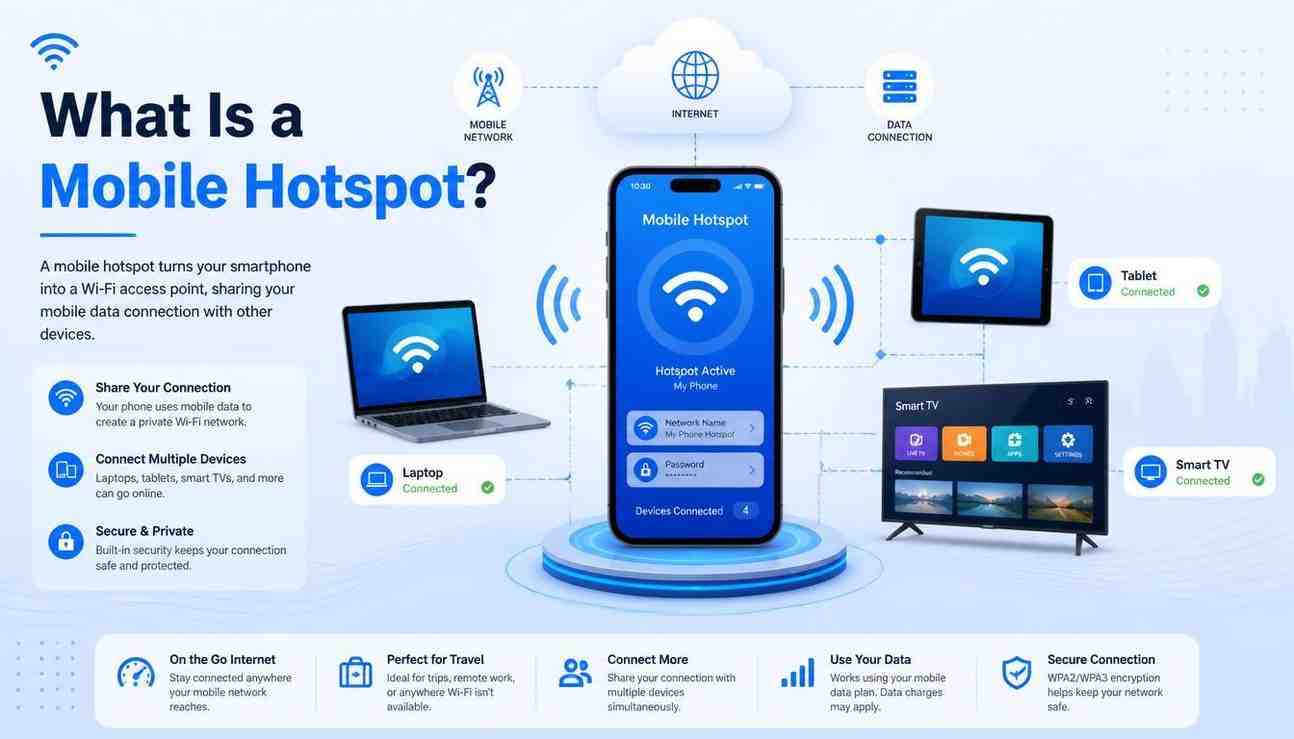
A mobile hotspot is a feature or a separate device that shares your phone’s cellular internet connection with other devices, like laptops, tablets, or smart TVs, through Wi-Fi. You can think of it as turning your smartphone into a portable Wi-Fi router that fits in your pocket.
When you connect your laptop to your phone’s hotspot, your laptop is essentially using your phone’s mobile data to go online. There’s no router, no cable, and no fixed internet plan needed.
In short, your phone’s cellular data connection becomes a Wi-Fi signal that other devices nearby can use.
Your smartphone is already connected to the internet through your carrier’s cellular network. This is the same network that allows you to stream music or browse Instagram. A hotspot takes that data signal and rebroadcasts it as a local Wi-Fi network that nearby devices can join.
The speed and reliability of your hotspot depend on the cellular signal in your location. If you have strong 5G coverage, everything will be fast and smooth. However, if you have weak 3G in a rural area, you can expect lag.
Not all hotspots come from a smartphone. Here are the main types you’ll run into:
Every modern iPhone and Android phone has a built-in hotspot feature. It’s free to enable if your carrier plan supports it. You just go to settings, turn it on, and share the password with anyone who needs to connect.
These are small, standalone gadgets, sometimes called MiFi devices or portable Wi-Fi routers. They only create a hotspot. They usually have better battery life than a phone using hotspot mode and can connect more devices at the same time. They are great for frequent travelers or remote workers.
You can plug your phone directly into your laptop with a USB cable, and your phone shares its internet connection through the cable. This method is less convenient than a Wi-Fi hotspot, but it charges your phone while it works and is often faster and more stable.
A hotspot is genuinely useful in more situations than people realize:
It’s also a useful backup plan. If your home internet goes down during a work call, flipping on your phone’s hotspot can save the day in seconds.
Yes, every byte of data you use through your hotspot comes from your mobile data plan. If you have a 10GB plan and stream two hours of video through your hotspot, that data comes directly from your monthly allowance.
It’s important to remember this. Activities like video calls, HD streaming, and software updates can use a lot of data quickly. On the other hand, text-based work emails, documents, and light browsing consume much less data.
Some carriers also limit hotspot speeds differently from your regular data. You might have unlimited phone data but experience slower hotspot speeds after reaching a set limit. Always check your plan details.
Yes, generally, it’s much safer than using public Wi-Fi. When you connect to your own hotspot, you control who has the password. Set a strong password; the default random ones are fine. Your connection is encrypted and private.
Public Wi-Fi networks at airports or cafes are shared with strangers and might not even require a password. Your hotspot removes that risk completely. Just avoid sharing your hotspot password with people you don’t trust.
It’s simpler than most people expect:
You can usually rename your hotspot network and set a custom password from the same screen. Once it’s on, other devices will see it like any Wi-Fi network in their list.
A mobile hotspot is one of the most practical features in your smartphone. It provides internet access wherever your cellular signal allows. Whether you’re working remotely, traveling, or dealing with a weak home connection, knowing how to use it gives you an advantage. The main thing to monitor is your data usage. Besides that, it’s a simple, secure, and genuinely useful tool that most people never fully utilize.
They’re closely related but not the same. Tethering is the broader term; it means sharing your phone’s internet connection with another device. A hotspot is one way to tether, using Wi-Fi. Other methods include USB tethering and Bluetooth tethering. Most people generally use the term “hotspot” to refer to the Wi-Fi option.
Yes, noticeably. Running a hotspot keeps your phone’s radio, processor, and screen active at the same time, which uses a lot of power. For longer sessions, keep your phone plugged in or use a dedicated hotspot device designed for this purpose.
Most smartphones support between 5 and 10 connected devices, but performance gets worse as more devices join. If you often need to connect many devices, a dedicated hotspot device works better and more efficiently.
No. A mobile hotspot relies entirely on your cellular data signal. Without cell service, you can’t use the hotspot. In areas with poor coverage, the hotspot may not work or could be very slow.
Yes, but international roaming data rates can be quite high. A better strategy when traveling internationally is to buy a local SIM card in the country you are visiting and use that for hotspot data. You can also consider an international travel plan from your carrier before you leave.

© 2025 Crivva - Hosted by Airy Hosting Managed Website Hosting.