

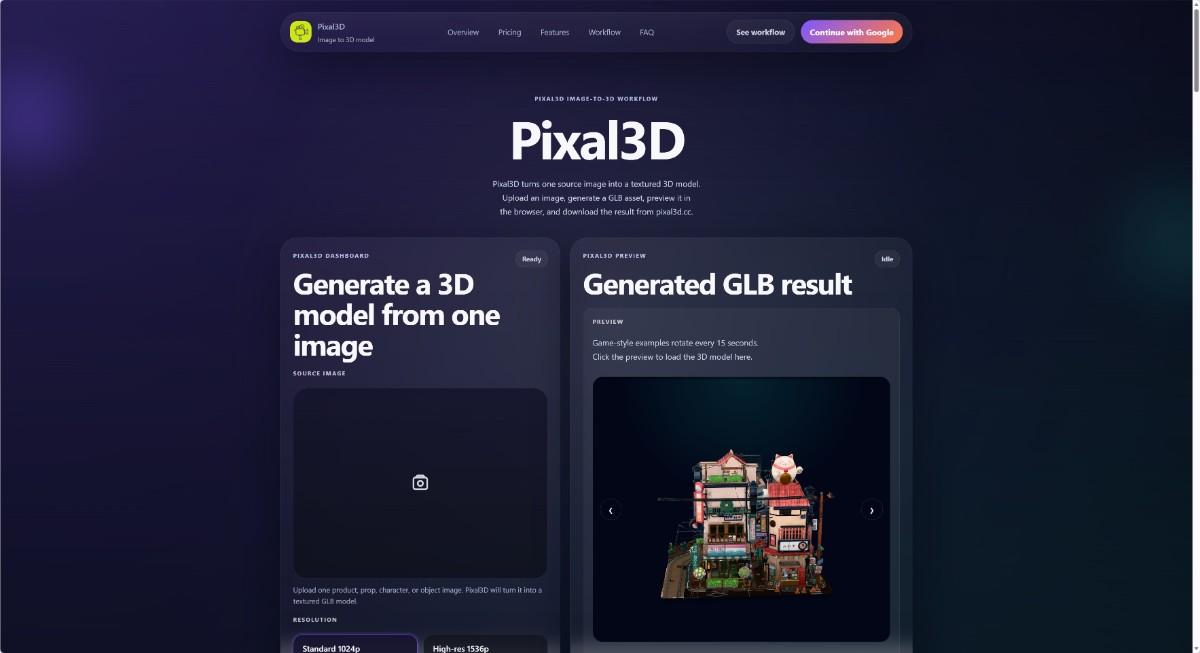
Have you ever needed a 3D model for a project but found the software too hard to learn? Pixal3D is a web tool that changes one image into a textured 3D model. You do not need to install anything. Everything works in your browser. This article explains what Pixal3D can do and who can use it.
## What Is Pixal3D?
Pixal3D is an image-to-3D model generator. You upload a single picture – for example, a photo of a product, a drawing of a character, or a picture of a prop. The tool then creates a GLB 3D model with texture. GLB is a file type that many 3D programs and websites can open. You can preview the model in your browser, download it, and use it later.
The website keeps your generation history. You can go back and download old models again. The tool uses a credit system. Each time you create a model, it uses some credits. You can buy credits or get them with a subscription.
## Who Is This Tool For?
Pixal3D is made for people who want a quick 3D model without learning complex 3D software. Here are some examples:
– **Product teams** – If you have a product photo and need a 3D preview for your website or catalog, Pixal3D can help.
– **Game developers** – You can turn a concept art image into a draft GLB asset for a game prop, character, or environment.
– **Indie builders** – If you are a solo maker or small team, you can test 3D ideas fast without hiring a 3D artist.
– **Designers** – Use it to create 3D drafts from sketches or photos before doing more detailed work.
– **Hobbyists** – Anyone who likes 3D modeling can try turning their own images into models for fun.
The tool works best when you have one clear image of an object, product, character, or prop. It is not designed for complex scenes or multi-angle photos.
## Core Benefits in Simple Words
– **One image is enough** – You only need one source image to start.
– **No software to download** – Everything happens in your browser.
– **Get a textured GLB model** – The result has color and texture, ready to use.
– **Preview before you download** – See the 3D model in your browser first.
– **Saved history** – Your past models are stored so you can download them again.
– **Two resolution options** – Choose standard (1024p) for quick drafts or high-res (1536p) for more detail.
## Where Can You Use the Models?
You can use the generated GLB models in many places. For example:
– Place them on your product page for a 3D viewer.
– Add them to a game or virtual world.
– Share them with teammates for feedback.
– Print them as 3D objects (if you convert the file).
– Use them in AR or VR apps.
The tool gives you a commercial use license with subscriptions, so you can use the models for business projects too.
## Final Thought
Pixal3D is not a full 3D design suite. It is a simple, focused tool for turning one picture into a 3D model fast. If you need a quick 3D asset and do not want to learn complicated software, this tool can save you time. Check it out at [Pixal3D](https://pixal3d.cc/) and see if it fits your workflow.
If you need a 3D model from a single picture, [Pixal3D](https://pixal3d.cc/) is a web-based tool that can do that for you. It is called an “image-to-3D model generator.” You upload one image—like a photo of a product, a character drawing, or a toy—and the site turns it into a textured GLB model. GLB is a common 3D file format that works in many apps and websites. You do not need to install any software. Everything happens in your browser.
This article explains what Pixal3D is and who it is for. The goal is to help you decide if this tool is useful for your work or hobby.
## What Is Pixal3D?
Pixal3D is a simple web tool. It takes one source image and creates a 3D model with texture. Texture means the model has colors and patterns from your original picture. The result is a GLB file. You can preview the model directly in your browser before you download it. The tool also saves your past results, so you can come back later and download them again.
Here are the main things Pixal3D does:
– **Generate a 3D model from one image** – You do not need multiple photos or a 3D scanner. One picture is enough.
– **Two resolution options** – You can choose between 1024p (faster, uses fewer credits) and 1536p (more detail, uses more credits). This lets you balance speed and quality.
– **Browser preview** – After the model is ready, you can rotate and zoom in your browser to check the result.
– **Download GLB** – If you like the model, you can download the GLB file to your computer.
– **Generation history** – All your successful models are saved. You can open them from your dashboard anytime.
– **Credit system** – Every generation uses credits. You buy credits with a subscription or pay-as-you-go. The website shows clear prices. For example, a standard 1024p model costs 70 credits, and a high-res 1536p model costs 100 credits. Credits from a subscription are used first, then any permanent credits you bought separately.
Pixal3D is operated by an independent developer. It may use third-party services for AI, storage, and payments, but your data is handled according to its privacy policy. You can contact support at [email protected].
## Who Is Pixal3D For?
Pixal3D is for people who need a quick 3D model from a picture but do not want to learn complex 3D software. It is also useful for professionals who want to test ideas fast.
Here are some groups that can benefit:
### 1. Product designers and e‑commerce teams
If you design a product and want to show it from all angles, you can take a photo and turn it into a 3D model. This is helpful for online stores, concept previews, or client presentations. You do not need a expensive 3D scanner.
### 2. Game developers and indie creators
Making a 3D model for a game prop, character, or environment can take a lot of time. With Pixal3D, you can quickly create draft models from concept art or photos. These drafts are not perfect, but they are a great starting point. You can then refine them in other tools.
### 3. 3D beginners and hobbyists
If you are just learning about 3D, Pixal3D is a friendly tool. You only need one image. The interface is simple: upload, choose resolution, generate, preview, download. You can see how a 3D model is made from a flat picture. It helps you understand the concept without getting lost in complicated settings.
### 4. Artists and character designers
If you draw characters or creatures, you can upload your art and get a 3D version. This can help you see your design from different sides. It is useful for checking proportions or generating inspiration for further modeling.
### 5. Anyone who needs a quick 3D preview
Maybe you are working on a fashion item, a toy, or a collectible. You can take a photo and get a 3D model to share with others. The model has texture, so it looks realistic. You can rotate it and show it on social media or in a presentation.
## Important Things to Know
– Pixal3D works best with a clear, well‑lit image of a single object. Complex scenes or blurry photos may not give good results.
– The generated model may not be perfect. It can have small errors or missing details. It is meant for quick drafts and concept work, not final production.
– You are responsible for the images you upload. Only use images you have permission to use.
– The service relies on third‑party AI, so results can vary. There is no guarantee that every generation will be exactly what you want.
## Pricing and Plans
Pixal3D offers a credit system. You can buy credits with a monthly or yearly subscription. There are three plans: Basic ($9.90/month or $118.80/year), Standard ($19.90/month or $238.80/year), and Pro ($49.90/month or $598.80/year). Annual plans save about 50% compared to monthly. Credits are used for each generation. For example, a 1024p model costs 70 credits, and a 1536p model costs 100 credits. With the Basic plan you get about 1,080 credits per month (enough for about 15 standard models). The Standard plan gives about 2,180 credits per month, and Pro gives about 5,480 credits per month. All plans include commercial use, private generation, and no watermark.
You can also contact support for questions about billing or tasks.
## Summary
Pixal3D is a straightforward web tool that turns one image into a textured 3D GLB model. It is designed for anyone who needs quick 3D models without learning difficult software. Product teams, game developers, artists, and beginners can all use it. You upload a picture, choose resolution, and get a 3D model you can preview and download. The dashboard saves your history, so you can reuse models later.
If that sounds useful, you can try Pixal3D at [pixal3d.cc](https://pixal3d.cc/). Start with a simple image and see what you get.

© 2025 Crivva - Hosted by Airy Hosting Managed Website Hosting.