You just signed up for a “100 Mbps” internet plan, and your phone carrier keeps selling you on “5GB of data,” and somewhere in between, you’re completely lost. Are those even the same thing? Is one better than the other? And why does your download still feel slow when the numbers look so huge? If you’ve ever stared at your phone bill or router settings wondering what the difference between a gigabit and a gigabyte actually is, you’re not alone, and the confusion is costing people real money on plans they don’t fully understand.
At first glance, gigabit and gigabyte look almost identical. But that lowercase b versus uppercase B is one of the most consequential typos you’ll never actually make because the industry uses them deliberately to describe two very different things.
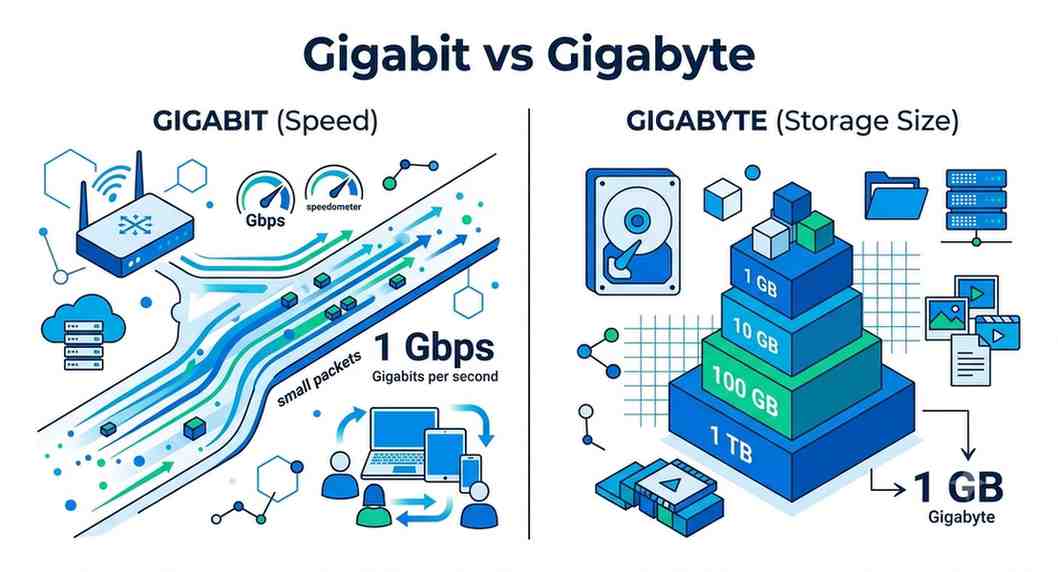
Here’s the short version:
Think of it like water. A gigabit is the width of the pipe, or how fast water flows through. A gigabyte is the size of the bucket you’re filling. You can have a massive pipe (fast speed) and still run out of bucket (data) quickly if you’re streaming 4K video all day.
A gigabit (Gb) is a unit of digital data equal to 1 billion bits. Bits are the absolute smallest unit of digital information, just a 0 or a 1. Everything your device does digitally is made of them.
In everyday life, gigabits show up in internet speed measurements. When your ISP says you’re getting “1 Gbps” (gigabit per second), that means your connection can theoretically transfer 1 billion bits every second. More commonly, speeds are quoted in megabits per second (Mbps), which is 1,000 times smaller than a gigabit per second.
A 100 Mbps connection is not “100 megabytes per second.” It’s actually about 12.5 MB/s because there are 8 bits in a byte. This is the #1 reason people feel misled by their internet speeds.
A gigabyte (GB) is a unit of digital storage equal to roughly 1 billion bytes or, more precisely, 8 billion bits. This is the unit you’re probably most familiar with in everyday life: your phone has 128 GB of storage, a movie file might be 4 GB, and your mobile data plan might include 10 GB per month.
Gigabytes describe volume, not speed. When you use 3 GB of data watching YouTube on your lunch break, you’re not talking about speed; you’re talking about how much information was transferred.
Here’s where the gigabit vs gigabyte confusion causes real-world headaches. When you’re downloading something, your speed is shown in megabits per second (Mbps), but your file size is measured in megabytes (MB) or gigabytes (GB).
To convert: divide your Mbps by 8 to get your actual download speed in MB/s.
|
Internet Speed |
Actual Download Speed |
1 GB File Takes… |
|
10 Mbps Basic |
~1.25 MB/s |
~13 minutes |
|
50 Mbps |
~6.25 MB/s |
~2.7 minutes |
|
100 Mbps |
~12.5 MB/s |
~80 seconds |
|
1 Gbps Gigabit |
~125 MB/s |
~8 seconds |
So when your ISP advertises a “gigabit plan,” they’re not saying you get a gigabyte of data every second; they’re saying your connection speed can theoretically reach 1,000 Mbps. You’re still using up your data plan in gigabytes, just faster.
Your phone’s data plan is measured in gigabytes, full stop. Whether you have a 5G connection or a modest 4G LTE signal, the speed only determines how quickly you burn through your data allowance, not how much you have.
A faster 5G connection doesn’t give you more data; it just lets you use it up faster. Streaming Netflix on 5G will use about 1 GB in 4–5 minutes at HD quality. On a slower 3G connection, that same gigabyte lasts longer simply because data loads more slowly. Same bucket, different pipe width.
This is why “unlimited” plans with speed throttling still feel limiting: the carrier slows your speed after a certain data threshold, not your total data. You can still use it, but you’ll spend five minutes waiting for a page to load instead of five seconds.
|
Feature |
Gigabit (Gb) |
Gigabyte (GB) |
|
What it measures |
Speed / transfer rate |
Storage / data volume |
|
Unit symbol |
Gb or Mbps |
GB or MB |
|
Used for |
Internet speeds, bandwidth |
File sizes, data plans, storage |
|
Conversion |
1 Gb = 0.125 GB |
1 GB = 8 Gb |
|
Example |
100 Mbps internet plan |
10 GB monthly data limit |
Understanding the difference between gigabit and gigabyte can save you from paying for the wrong thing. If you work from home and stream video all day, you need a high-speed plan (measured in Mbps/Gbps) and potentially an unlimited data plan (in GB). If you mostly browse and check email, a slower, cheaper plan with a modest data cap might serve you just fine.
On mobile specifically, don’t let a carrier dazzle you with “5G gigabit speeds” if what you actually need is a larger data allowance. A 5G plan with 3 GB of data will feel worse than a 4G plan with 20 GB, depending on your usage habits.
The difference between a gigabit and a gigabyte comes down to speed versus volume, and once you see it that way, the confusion disappears. Gigabits (Gb) measure how fast data travels; gigabytes (GB) measure how much data you have or store. Your internet speed is always in gigabits (or megabits), while your data plan and file storage are always in gigabytes. Keep that distinction in your back pocket, and you’ll never be misled by a confusing spec sheet or a carrier upsell again.
No, and this is the most common misconception. 1 Gbps means 1 gigabit per second in terms of speed. Since there are 8 bits in a byte, that translates to about 125 MB (megabytes) per second of actual file transfer. So a 1 GB file would take roughly 8 seconds to download at peak 1 Gbps speeds, not 1 second.
One gigabit equals 0.125 gigabytes (GB), or 125 megabytes (MB). Conversely, 1 gigabyte equals 8 gigabits. The key is remembering that there are 8 bits in every byte, so whenever you see speeds in Mbps or Gbps, divide by 8 to get the real-world file transfer rate in MB/s or GB/s.
Indirectly, yes. A faster connection doesn’t change the size of the files being transferred, but it can enable higher-quality streaming (such as auto-switching from 720p to 4K), which uses significantly more data. A 4K stream uses about 7 GB per hour compared to around 1 GB for standard HD, so a faster connection can lead to higher data consumption if your settings aren’t capped.
This is an industry-wide convention (some would say a source of deliberate confusion). Internet speeds are marketed in megabits per second (Mbps) because the numbers look bigger and more impressive. File sizes and storage are measured in megabytes (MB). To convert: divide your Mbps speed by 8 to get your MB/s download rate. A 50 Mbps plan gives you roughly 6.25 MB/s of real download speed.
On a phone plan, the data allowance (like “10 GB/month”) is measured in gigabytes, that’s how much data you can transfer in total each billing cycle. Network speed (5G, 4G LTE, etc.) is typically measured in gigabits per second, indicating how fast your connection transfers data. Your plan’s GB cap is what actually limits your usage; the speed just determines how quickly you reach that cap.

© 2025 Crivva - Hosted by Airy Hosting Managed Website Hosting.