

In today’s fast pace financial environment, accounts payable (AP) departments are under immense pressure to operate more efficiently, reduce errors. and maintain compliance, all while dealing with an ever-growing influx of invoices. Manual data entry, paper based workflows, and approval bottlenecks not only slow down operations but also bump up the risk of human error and those missed payment deadlines that nobody wants.
To stay ahead, many finance teams are adopting AP automation tools. One approach getting a lot of attention is Continia Document Capture, a full featured add-on for Microsoft Dynamics 365 Business Central that’s changing how organisations handle invoice processing in the real world.
In this article, let’s see how Continia Document Capture is reshaping accounts payable procedures and what’s driving finance teams to make the switch.
Industry trends
Businesses are rapidly leaning into AP automation to cut down manual workloads, you know. Finance leaders are putting emphasis on digital transformation programs, more and more lately. Cloud based invoice processing is gradually replacing the paper heavy AP workflows. Also AI alongside OCR tools are making invoice capture more precise and faster, in a real way.
Continia Document Capture is a powerful, certified add-on for Microsoft Dynamics 365 Business Central. It specializes in automating the capture, processing, and approval of incoming documents especially purchase invoices. Continia Document Capture is the best and most comprehensive end-to-end add-on solution for Microsoft Dynamics that scans, extracts OCR-data, registers, posts, and archives all types of documents with full-text search capability.
Key functionalities include:
Here are the top 5 reasons finance teams are making the switch to Continia Document Capture.
Continia Document Capture is designed to streamline the entire lifecycle of invoice management from data capture to approval and archiving.
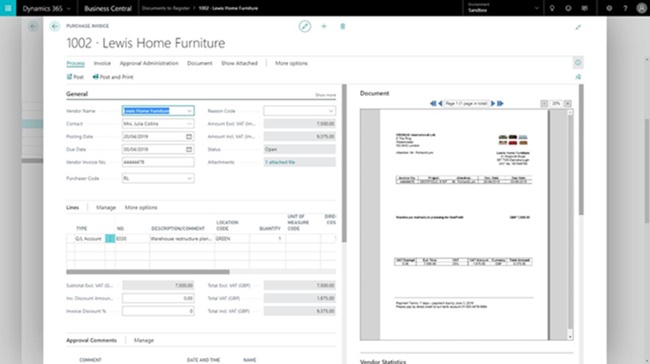
It automatically scans incoming invoices (whether received by email or uploaded), extracts relevant data using advanced OCR (Optical Character Recognition), and matches the information with purchase orders in Business Central. Once verified, invoices are routed through pre-defined approval workflows and then posted to the general ledger with minimal manual input.
This end-to-end automation significantly reduces manual effort and processing time.
One of the standout features of Continia Document Capture is its native integration with Dynamics 365 Business Central. Unlike third-party tools that require complex integration layers or custom configurations, Continia is built to work inside your existing ERP system.
This means users can access invoice documents, approval workflows, and audit trails directly within Business Central without toggling between platforms or losing context.
Continia’s built-in OCR engine sets it apart from many other AP automation tools. It doesn’t just scan invoices, it intelligently extracts key data such as vendor name, invoice number, dates, amounts, and line items, even from complex invoice layouts or non-standard formats.
The system “learns” from user corrections, becoming more accurate over time. This self-learning capability ensures high data accuracy and reduces the need for manual verification.
Every organization has its own rules for invoice approvals, and Continia Document Capture provides the flexibility to support them all. The platform offers fully customizable approval workflows that can be tailored by department, invoice amount, or specific vendors.
Approvers are notified via email or within Business Central, and can review, approve, or reject invoices with just a few clicks. All actions are logged, creating a complete audit trail that supports compliance and simplifies internal or external audits.
In today’s regulatory environment, transparency and traceability are non-negotiable. Continia Document Capture enhances compliance through robust document archiving and audit trails. Every invoice is stored digitally and linked to its corresponding transaction in Business Central, making retrieval fast and easy.
Whether you’re preparing for an audit or simply need to track down an old invoice, Continia’s digital archive ensures everything is just a few clicks away. Documents are stored securely and are searchable using various criteria like vendor name, invoice number, or date range.
Here’s how Continia transforms a typical AP workflow:
|
Traditional AP Process |
Automated with Continia |
|
Manual invoice receipt |
Auto-import via email or scan |
|
Manual data entry |
OCR extracts data instantly |
|
Paper-based approval routing |
Digital multi-level workflow |
|
Matching done manually |
Automatic 2/3-way matching |
|
Hardcopy storage |
Secure digital archiving |
The entire lifecycle from invoice receipt to payment is streamlined, minimizing human touchpoints and maximizing accuracy.
This approach is ideal for:
Conclusion
The shift to AP automation is no longer a “nice to have”, it’s a strategic imperative. Continia Document Capture stands out as a best-in-class solution for organizations using Microsoft Dynamics 365 Business Central. Its deep integration, intelligent data capture, and robust workflow automation make it a powerful tool for finance teams looking to modernize operations, reduce costs, and improve compliance.
If your AP team is still bogged down by manual processes, it may be time to explore how Continia Document Capture can transform your finance function.
Looking to streamline invoice processing and improve finance efficiency with AP Automation? Connect with Dynamics Square to explore how Continia Document Capture can modernize your accounts payable operations.
Name: Dynamics Square Australia
Location: Sydney, NSW, Australia
Phone: +61 2 8607 5117

© 2025 Crivva - Hosted by Airy Hosting Managed Website Hosting.