Add Live Chat for Website Without Building from Scratch
Software
primocys
April 13th, 2026
No Comments
10:14 AM
You already have a product — a website, a mobile app, a SaaS platform. Now you need messaging. Adding a chat feature for website and app users in 2026 is no longer a months-long engineering project. The fastest way to get live chat for website visitors is integrating a production-ready module into what you already built — real-time messaging, free audio and video calls, AI smart replies — without a full rebuild. Here is exactly how it works.
Most businesses reach a point where their existing product needs messaging. An e-commerce platform that wants buyer-seller chat. A SaaS tool that needs team collaboration built in. A healthcare app that needs patient-doctor communication. A marketplace that needs real-time support.
The traditional options — pay a monthly fee for a third-party chat service or spend 6 months building a full messaging system from scratch — are both expensive in different ways. There is a third option: integrate a production-ready, self-hosted chat module directly into your existing mobile app or website via API, with complete ownership of the code and the data.
At Primocys, we have built this exact system — documented in detail from our ReelBoost Messaging System, a production-ready real-time chat infrastructure built on Node.js, PostgreSQL, Socket.io, and AWS S3. This guide walks you through every aspect of it.
4x
Higher retention with in-app chat features
67%
Users prefer in-app chat over email support
3–6w
Time to integrate chat module into an existing app
$0
Per-minute call charges with self-hosted WebRTC
1. Why Add Chat to Your Existing Product?
Adding a chat feature for your website or mobile app is one of the highest-ROI feature investments a product team can make in 2026. Whether you want to add live chat to your website for customer support or embed a full real-time chat feature for website users, the business case is clear. Here is why:
Retention: Users who message inside your app have significantly higher day-30 retention than those who don’t. A well-placed chat widget for website creates habit loops that bring users back daily.
Support cost reduction: Live chat for website reduces external support tickets by letting users resolve issues in real time — often peer-to-peer or with a chatbot for website handling common queries before a human agent is needed.
Trust and conversion: For marketplaces, e-commerce, and service platforms, the ability to message before purchasing is a proven conversion driver. Users buy from sellers they can talk to via live chat integration.
Data ownership: Building your own chat module — rather than embedding a third-party widget — means every conversation stays in your database, on your server, analyzable by your team.
Competitive differentiation: In 2026, users expect messaging everywhere. Platforms without a proper chat feature for website or app feel incomplete against competitors who have it natively built in.
💡 The key question is not whether to add chat — it is whether to use a third-party SaaS widget (quick but expensive long-term, no data ownership), build from scratch (slow, costly), or integrate a production-ready module into your existing stack. For most businesses, the third option is the right one.
How to Add Chat to Website — The Right Way
When businesses ask how to add chat to website, they typically think of two options: pay for a monthly SaaS tool, or build from scratch. But there is a smarter third path — integrating a production-ready chat API for website that gives you full code ownership, zero monthly SaaS fees, and a fully customised experience that matches your brand. That is exactly what this guide covers.
2. Three Ways to Add Live Chat for Website or App
If you are researching how to add live chat to website without a full rebuild, these are the three paths available to you. Understanding the trade-offs helps you choose the right approach for your product’s scale, budget, and long-term goals. The goal is always the same: a reliable live chat integration that works for your users — without locking you into recurring costs or someone else’s infrastructure.
Press enter or click to view image in full size
✅ What Primocys provides is the third option — a complete, production-tested chat infrastructure built on Node.js + Socket.io, PostgreSQL, AWS S3, and self-hosted WebRTC, integrated into your existing product via documented REST API and Socket events. If you’re wondering how to build a chat app like WhatsApp from the ground up, read our full guide: How to Build a Chat App Like WhatsApp. Everything below describes exactly what is included in the integration module.
3. All Features Included in the Chat Module
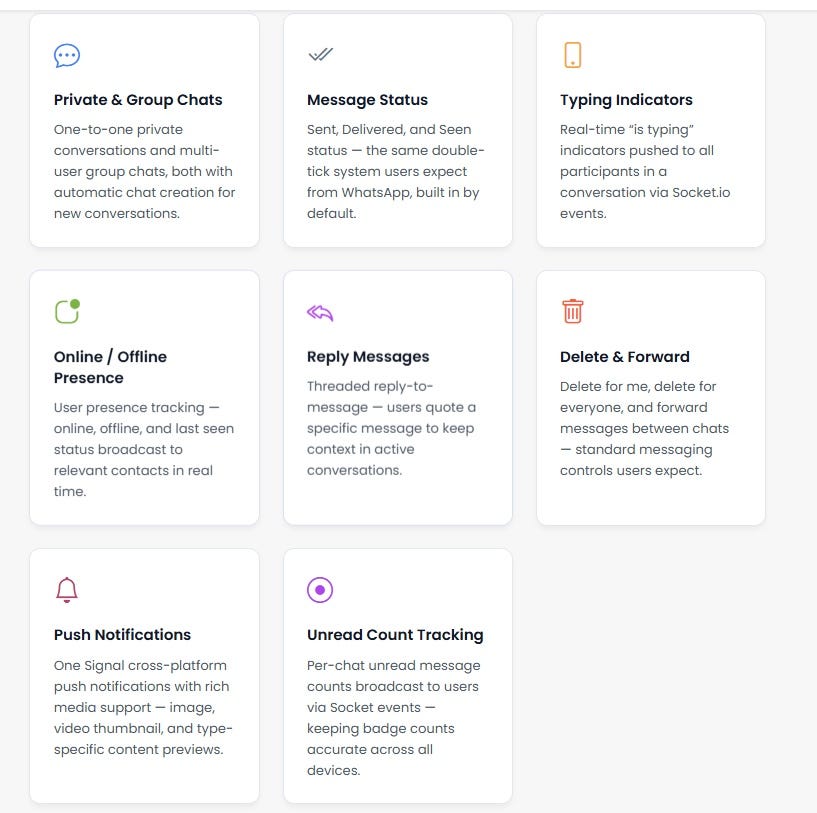
This is not a basic chat widget for website. The Primocys chat module is a comprehensive real-time communication system — the kind of live chat integration that powers consumer messaging apps — with the following features built in as standard. Whether you need a simple chat feature for website visitors or a full in-app messaging system for your mobile product, everything listed below is included.
Not sure which chat app features matter most for your users? Read our detailed breakdown: chat app features your users will love in 2026 — covering the must-haves before you build or integrate.
Real-Time Messaging & Live Chat for Website
Press enter or click to view image in full size
4. Supported Message Types
The chat module supports six distinct message types — each with specific upload, storage, and notification handling built in:
Press enter or click to view image in full size
💡 Video handling detail: When a video message is sent, the system generates a thumbnail automatically — stored as a separate S3 object. Push notifications include the thumbnail as a rich preview image. This is the same pattern used by WhatsApp and Telegram for video messages.
5. How Messages Work — The 8-Step End-to-End Lifecycle
Every message sent through the chat module follows a documented, production-tested 8-step lifecycle from client tap to recipient notification. This is what separates a proper live chat integration from a basic embedded widget — and why knowing how to add chat to website the right way matters. Here is exactly what happens:
01
Message Initiation
Client sends an HTTP POST to /chat/send-message with the message type, content, and any media files.
02
Authentication & Validation
JWT Bearer Token is verified by the auth middleware. User existence is confirmed. Required fields and media files are validated before processing.
03
Chat Management Logic
If a chat_id exists, that chat is used. If a user_id is provided, the system checks for an existing private chat — and creates a new one with both users as participants if none exists.
04
Message Processing
Message record created in the database. Media uploaded to AWS S3. Social sharing handled. Video thumbnails generated automatically.
05
Real-Time Distribution
Server emits events via Socket.io to all connected clients involved in the chat — sender and all recipients receive the message simultaneously.
06
Message Status Updates
Sender’s message is immediately marked Seen. Recipient’s message is marked Delivered. Status updates are pushed to all connected sockets.
07
Push Notification Delivery
One Signal delivers type-specific notifications with rich media support — image previews for image messages, thumbnails for video messages, document type indicators for files.
08
Socket Event Broadcasting
The receive event is emitted to both sender and receiver socket connections, including the current unseen message count for badge updates.
Conclusion
Adding a chat feature for your website or mobile app in 2026 no longer requires months of backend engineering or expensive recurring SaaS fees. The right approach — integrating a production-ready, self-hosted chat module via a chat API for website — gives you everything: real-time messaging, free WebRTC audio and video calls, AI smart replies, and complete data ownership, all delivered in 3 to 6 weeks..
The businesses that benefit most are those that move quickly. Whether you want to add live chat to your website for customer support, embed group messaging inside a marketplace, or deploy a full chatbot for website to handle first-contact queries automatically — the infrastructure exists today, and integration does not require a full product rebuild.
What to Do Next
If you are evaluating whether to build chat app without backend work from scratch or integrate a proven module, consider these three steps:
Define your use case — customer support chat, peer-to-peer messaging, or a team collaboration tool each have different feature requirements. Review the chat app features guide to shortlist what your users actually need.
Understand your architecture — if you are building for enterprise clients, the approach differs from a B2C consumer app. Our b2b application development guide breaks down the key differences in data model, access control, and compliance requirements.
See the full product — if you want to understand the full scope of what a standalone chat app built from scratch looks like, the guide on How to Build a Chat App Like WhatsApp covers every layer: tech stack, timeline, cost, and feature set.
✅ The bottom line: iLive chat integration is the fastest path to adding real-time messaging to your existing product. A chat widget for website can go live in days. A full in-app messaging system with voice calls and AI features can be integrated in weeks. You do not need to build from scratch — and in most cases, you should not.
Crivva is a professional social and business networking platform that empowers users to connect, share, and grow. Post blogs, press releases, classifieds, and business listings to boost your online presence. Join Crivva today to network, promote your brand, and build meaningful digital connections across industries.